


Time profiles of the Packetfilter
Last adaptation to the version: 12.7.0
New:
- Display of the package filter descriptions in the overview
notempty
This article refers to a Beta version
Time profiles
UTMuser@firewall.name.fqdn Firewall 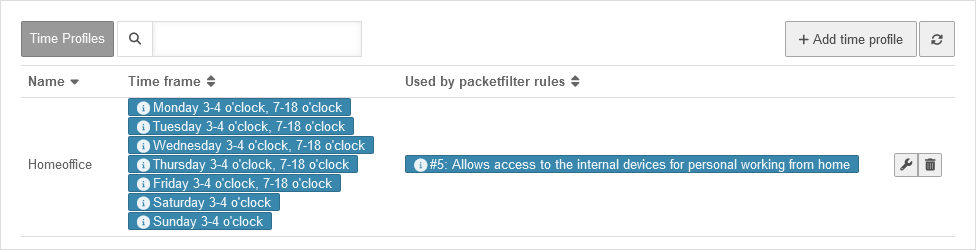

Time profiles overview
Time profiles are used to activate packet filter rules only at specified times. They can be configured under
In the example shown, the profile applies daily between 3:00 am and 3:59:59 am and on weekdays from 7:00 am to 5:59:59 pm. This can be seen in the table under time window.
Under Used in packet filter rules, the IDs are listed together with the descriptions of the packet filters for which this time profile is set up. The packet filter can also be edited by clicking on the corresponding entry.
The Name column shows an assigned name that should describe the time profile.
Create time profiles
UTMuser@firewall.name.fqdn Firewall Time profiles 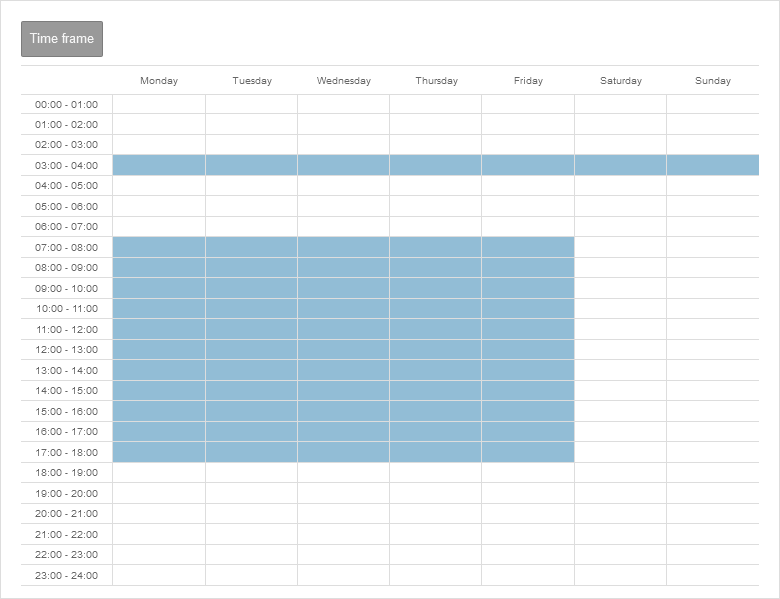

Add time profile
- Create a time profile under button .
- Select times
- Individual fields or time ranges can be selected by clicking the mouse
- Several fields and time ranges can be selected by holding down the mouse button
- Accept the time settings with the button Save and close
Use time profiles
Time profiles can be selected under the
Extras
section when creating or editing packet filter rules.