


Description and Configuration of Unified Security Reporting for UTMs
New function up from August 2019
- New
- Branding for sent reports possible (from 1.4.8 11.2019)
Scope of Unified Security Reporting
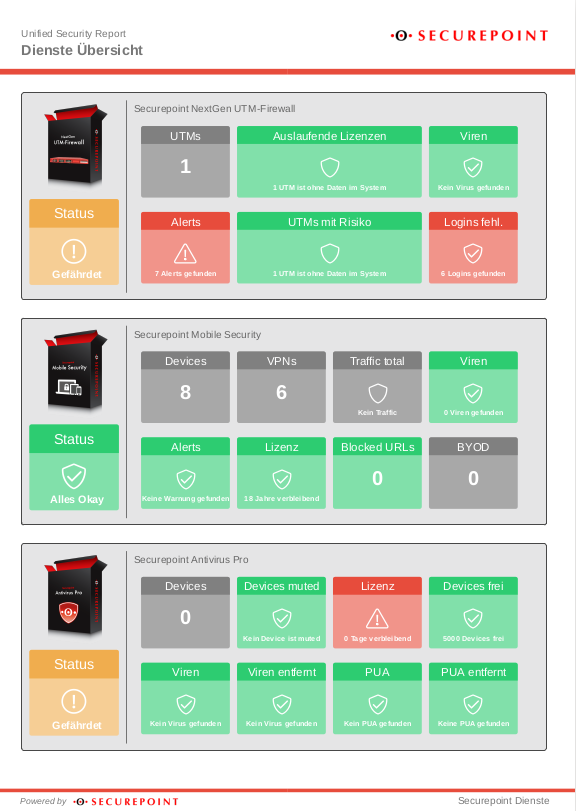
The Securepoint Unified Security Threat Report can be used to visualize the security status of all devices and services. This applies to Securepoint NextGen UTM firewalls, Antivirus Pro and Mobile Security.
The report is structured as a simple traffic light display:
- red means high risk
- yellow means endangered
- green means that all systems are OK
This visualization offers orientation and contains clear recommendations for action, with which the green status and thus the highest degree of security can be achieved again as quickly as possible. Overviews are available globally for all systems used, as well as in detail for the individual solutions.
- Global Services
- Individual services
- Current risk assessments of the individual services (e.g. alerts, viruses, e-mail quarantine and user activities)
- Devices, licenses, users
- Traffic and security categories
- Performance of the systems used
- Risk assessments and recommendations for action
Administrative requirements
Availability
Unified Security Reporting is available for the following products:
- UTM (Hardware and VM, from v11.8.4)
- Antivirus Pro (Client and Server)
- Mobile Security
Activation of licenses

In order to use Unified Security Reporting, it is necessary to activate the desired licenses chargeable in the Resellerportal:In the tab
Lizenzen the Unified Reporting can be activated in the corresponing column with Aktivieren The subsequent contract must be accepted and signed with your personal password, and a indicates that this license has already been activated for USR.
Access configuration
The configuration takes place in the Securepoint Unified Security Portal under https://portal.securepoint.cloud
UTMs
UTMs Overview

| Caption | Value | Description |
|---|---|---|
| model | VM | Display of the device type |
| id | 12345678-abcd-efgh-1234-123456789012 | Unique device identification of the UTM |
| Tenantdomain: | 1234nn.sms |
Name
| Caption | Value | Description |
|---|---|---|
| Name | utm() | Runs out on |
| Runs out on | 2020-08-27 | UTM License expires on this date |
| model | VM | UTM Model Type. This entry simplifies the assignment in the report and in the overview. |
| Tenantdomain: | 1234nn.sms | Tenant domain to which this license is assigned (and via which this is accessed) |
| Licensed | Zeigt, ob die UTM lizenziert wurde. |
Changes are accepted with Save.
Reports
Reports Overview

| Caption | Value | Description |
|---|---|---|
| Type | USR | Type of report (Executive Summary Report) |
| Theme: | securepoint | |
| Period: | Month, Week | Frequency of the report |
| Recipients: | martin.mueller@ttt-point.de ✕, ppetersen@ttt-point.de ✔ |
These recipients can receive a mail with a download link for the report. |
| Reports: | 8 Reports: | Displays an overview of the reports. Use Send mail to resend an email with a link to the report to all recipients. |
Reports Details
| Caption | Value | Description |
|---|---|---|
| Report name | USR | Customizable name for this report |
| Type | USR | Report type USR (Unified Security Report) (fixed default) |
| Theme: | Securepoint GmbH | (fixed default) |
| Recipients: | ✕ martin.mueller@ttt-point.de | Select Recipients for this report.
Any recipient address can be entered via the keyboard.   
Recipients displayed in the overview: martin.mueller@ttt-point.de ✕ Receipt of email has not yet been confirmed by recipient martin.mueller@ttt-point.de ✔ Receipt of email was confirmed by the recipient |
| Period | Month | Select the time period for this report Selectable values in the click box: Month Week |
Changes are accepted with Save.

Branding
It is possible to customize the Unifeid Security Report with your own logo and colors.
Configure in menu → → .
The following settings are necessary or possible:
| Beschriftung | Wert | Beschreibung |
|---|---|---|
| Use branding | Defines wether these branding settings are used or not | |
| Exclude client-reports | In the clickbox you can select customers whose reports should not be branded. | |
| Cover-Sheet | ||
| Logo | Change logo | Picture for the cover sheet. Accepted file formats: jpg, jpeg & png. |
| Delete logo | Removes the current logo | |
| Text | If you have any questions about this report, please feel free to contact our hotline.(Default) | Text for the cover page (max 160 characters) |
| Header | ||
| Color | By clicking on the color area, a selection window opens in which the color of the bar under the header line is defined. | |
| Logo | Change logo | Logo for the header. Accepted file formats: jpg, jpeg & png. |
| Delete logo | Removes the current logo | |
| Footer | ||
| Color | With a click on the color area a selection window opens with which the color of the bar above the footer can be defined. |
C.a. 30-40 seconds after first time klicking Save an additional button appears: Download preview
You can Generate a new Preview and Download an existing (or just created) one.
Outcome
Once a report has been created, the recipients of the report receive an email with the subject : »1234nn.sms: A Unified Security report has been created«
The first number ending in .sms is the tenant name for the account for which the report was created. In this mail there is a link to the report which can then be downloaded.
Example report as pdf