


New at Securepoint: 10.2026
notempty
This article refers to a Beta version
-
The AdminWizard setup program is personalized and already contains the certificates for accessing the Application Control Appliance.
Prerequisites
AdminWizard has the following prerequisites:
- .NET Framework 4.6.1
- VC-redist_2017
- Remote Server Administration Tools (only during the initial setup of the Remote Client Management)
- Start as domain administrator (only during initial setup) Remote Client Management)
Installation Process
The AdminWizard installation wizard process is divided into five steps
| 1. | 2. | 3. |
| Abb.1 | Abb.2 | Abb.3 |
| Abbildungen | ||

Installation step 1
Allow the AdminWizard to be installed

Installation step 2
Welcome dialog.
All other applications should be closed before starting the installation so that the installation can be performed without a restart
All other applications should be closed before starting the installation so that the installation can be performed without a restart

Installation step 3
Selection of the destination folder

Installation step 4
Installation progress indicator

Installation step 5
Installation is complete.
Commissioning
When setting up the AdminWizard, the following steps must generally be performed:
| 1. | 2. | 3. |
| Abb.1 | Abb.2 | Abb.3 |
| Abbildungen | ||

Setup step 1
The IP address must be the one assigned to the appliance via DHCP
The default password is password. After completing the AdminWizard setup, a secure password should be assigned under Securepoint Appliance
If the appliance is still running a version below 5.0.0, communication between AdminWizard and the appliance cannot take place due to invalid certificates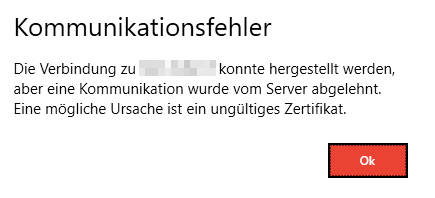
The default password is password. After completing the AdminWizard setup, a secure password should be assigned under
Securepoint ApplianceIf the appliance is still running a version below 5.0.0, communication between AdminWizard and the appliance cannot take place due to invalid certificates

SAC 3.0 Admin Wizard Kommunikationsfehler.png

Setup step 2
If a connection and communication between the appliance and AdminWizard have been successfully established, this welcome dialog appears.

Setup step 3
The setup wizard opens after the initial launch.
Here, you can see which steps have already been completed and which have not.
Here, you can see which steps have already been completed and which have not.

Setup step 4
If a data backup from a previous AdminWizard exists, it can be restored here using the button.
This applies all settings from the backup.
This applies all settings from the backup.

Setup step 5
For a , the appliances must be configured.

Setup step 6
For each appliance, it is possible to configure
- IP
- Subnetmask
- Gateway
- DNS
- Syslog
- NTP

Setup step 7
After configuring the appliance's IP settings, it must be restarted.