notempty
Dieser Artikel bezieht sich auf eine nicht mehr aktuelle Version!
notempty
Der Artikel für die neueste Version steht hier
notempty
Zu diesem Artikel gibt es bereits eine neuere Version, die sich allerdings auf eine Beta-Version bezieht



DNS Rebinding Prevention
Last adaptation to the version: 12.6.1
New:
- Updated to Redesign of the webinterface
notempty
This article refers to a Beta version
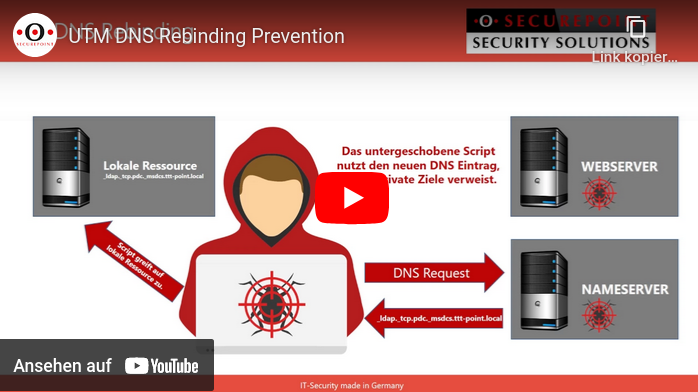
DNA rebinding attack and prevention
This type of attack attempts to gain access to internal resources using falsified DNS responses.
The attacker needs nothing more than a domain with malicious code and a name server that answers all DNS queries for the attacker site.
The attack is carried out in several steps:
1. the victim is lured to a prepared website whose IP address is only marked as valid for a few seconds.
2. Malicious code is loaded on the website, which starts a new call after the IP address has expired,
3. but which now uses a modified, proprietary DNS server to display an address from the victim's local network as the destination
4. The attacker now has access to the host with the internal IP through his malicious code (e.g. Java script)
1. the victim is lured to a prepared website whose IP address is only marked as valid for a few seconds.
2. Malicious code is loaded on the website, which starts a new call after the IP address has expired,
3. but which now uses a modified, proprietary DNS server to display an address from the victim's local network as the destination
4. The attacker now has access to the host with the internal IP through his malicious code (e.g. Java script)
DNS rebinding prevention prevents internal IP addresses from the local network from being issued in response to a DNS query.
Configuration
DNS Rebinding Prevention is configured under Area DNS Rebinding Prevention.
| Caption | Value | Description | UTMuser@firewall.name.fqdn Applications  DNS Rebinding Prevention tab
|
|---|---|---|---|
| DNS Rebinding Prevention: | On default |
Activates DNS rebinding prevention | |
| Mode: | In the factory settings, all private IP addresses (class A, B and C) are blocked. The corresponding private IPv6 addresses and the unique local unicast address are also protected in automatic mode. | ||
| The addresses can be set manually. | |||
| Protected addresses: | All addresses that are protected by the prevention are displayed here. | ||
| Saves the settings | |||
| Protected aliases | |||
| The DNS entries already configured are activated as protected aliases by default.
| |||