


Explanation of the procedure for routing all traffic from one UTM through another UTM via VPN
New article: 10.2026
notempty
This article refers to a Beta version
-
Preliminary Note
If the data traffic from one UTM is to be routed through another UTM, this can be achieved using a WireGuard VPN connection.
The UTM whose traffic is to be routed through another UTM is referred to below as the branch office.
The UTM through which the traffic is to be routed is called the Headquarters.
Create a WireGuard tunnel
- Headquarters Branch office
First, keys in x25519 format must be created on both UTMs.
Instructions for this can be found here.
The public portions of the keys are required for the mutual WireGuard tunnels.The public key of the branch office must be entered at the central site when establishing the WireGuard connection, and vice versa. - Under create a connection. You can proceed in almost the same way as when creating an S2S connection, which is explained here.
However, note the following points:- Branch office
- Transfer network: Unused private IP address
- Server network: local network of the remote site (usually on _internal_network_)
- Peer network: 0.0.0.0/0
- Endpoint: public IP or the publicly resolvable FQDN of the headquarters
- Public key: public part of the headquarters' x25519 key
- Keepalive: Yes
- Create routes: No, as otherwise problems may occur with the default route
- Create zones/network objects/rules: Yes
- Headquarters
- Transfer network: Unused private IP address within the same network range as in the remote site
- Server network: local network of the headquarters (usually on _internal_network_)
- Peer network: the network that has been released as the server network on the other side
- Endpoint: public IP or the publicly resolvable FQDN of the remote site
- Public key: public part of the remote site's x25519 key
- Keepalive: Yes
- Create routes/zones/network objects/rules: Yes
- Branch office
Create packet filter rules
- Branch office : In the remote site, the automatically created rules are sufficient.
- Headquarters : Under with button create a new rule .

Note the following points:

General
| ||
| Source |  internal-network internal-network
| |
| Target |  internet internet
| |
| Service |  any any
| |
| Action | ||
[ - ] NAT
| ||
| Type | ||
| Networkobject |  external-interface external-interface
| |
| Service | ||
Create routes
- Headquarters The automatically created routes are sufficient
- Branch office
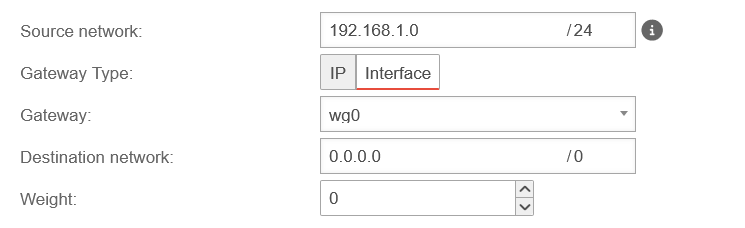
- First identify all networks of the remote site that are to be routed via the headquarters, for example 192.168.1.0/24
- Under Area Routing with button create a new route for each of these networks that routes the internal network to the internet (0.0.0.0/0) via the WireGuard interface
Source network 192.1.68.1.0 /24 Gateway type Gateway wg0 Destination network 0.0.0.0 /0 - The default route must not be changed. Otherwise the UTM does not know where to find the remote end of the WireGuard tunnel.
