In dieser Seite werden die Variablen für unterschiedliche Sprachen definiert.
Diese Seite wird auf folgenden Seiten eingebunden
Android profile configuration in the Personal use menu item
Last adaptation to the version: 2.5 (05.2025)
New:
notemptyThis article refers to a Beta version
-
| Caption |
Value |
Description
|
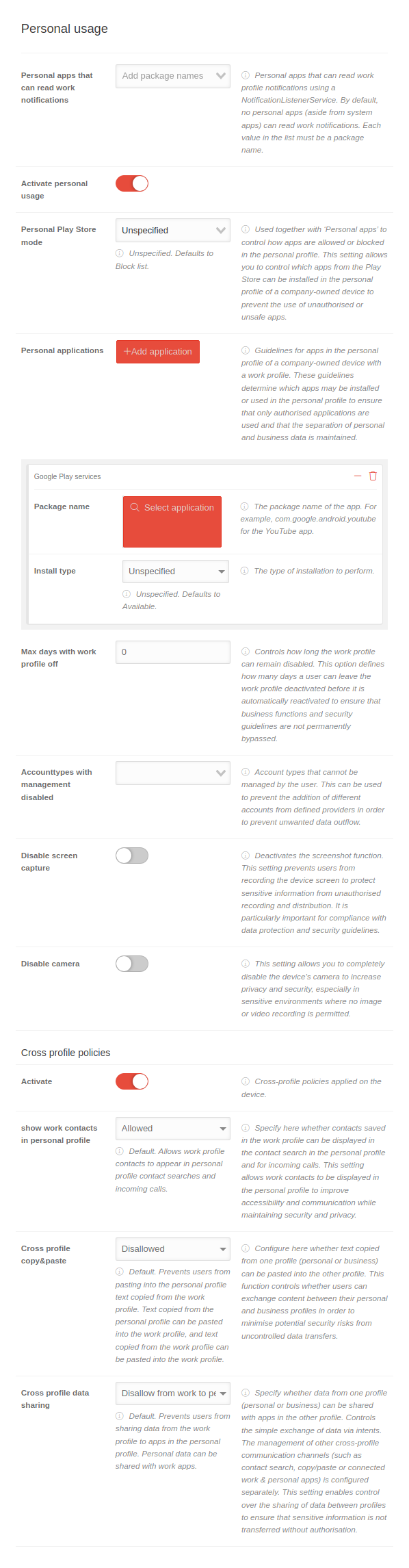 Personal use
|
| Personal apps that can read work notifications |
Add package name |
- Personal apps that can read work profile notifications with a NotificationListenerService
- By default, no personal apps (except system apps) can read work notifications
- Each value in the list must be a package name
|
| Activate personal use |
|
Activation allows you to configure the personal use of the Android device
|
| Personal Play Store mode |
Not specified |
Used together with "Personal apps" to control how apps are allowed or blocked in the personal profile.
|
| Not specified |
Not specified. Block list by default.
|
| Allowlist |
Only apps that are explicitly specified in "Personal apps" and whose "Installation type" is set to "Available" may be installed in the personal profile.
|
| Blocklist |
All Play Store apps can be installed in the personal profile, except for those whose installation type is "Blocked" under "Personal apps".
|
|
| Personal applications |
Add applications |
Guidelines for apps in the personal profile of a company-owned device with a work profile.
Each click on the button adds a section Application by customizing an app.
|
| Package name |
com.google.android.youtube Select application |
The package name of the app. For example, com.google.android.youtube for the YouTube app.
Clicking on the button Select application opens the Google Play Store to select the app.
|
Installation type
Only appears when an app is selected in Package name. |
Not specified |
The way the installation is performed.
|
| Not specified |
Not defined. Equivalent to Available.
|
| Block |
The app is blocked and cannot be installed. If the app was installed using an old profile, it will be uninstalled.
|
| Available |
The app is ready for installation.
|
|
| Max. days without work profile |
0 |
Controls how long the work profile can remain switched off.
|
| Account types with management disabled |
|
Account types that cannot be managed by the user
|
| Disable screen capture |
|
If is activated, the screenshot function is deactivated.
This setting prevents users from recording the device screen to protect sensitive information from unauthorized recording and distribution.
It is particularly important for compliance with data protection and security guidelines.
|
| Disable camera |
|
When activated , the device's camera is completely deactivated.
This increases privacy and security, especially in sensitive environments where no image or video recording is permitted.
|
| Cross-profile guidelines
|
| Activate |
|
If is activated, cross-profile policies are applied to the device
|
| Show work contacts in personal profile |
Allowed |
- Specifies whether contacts saved in the work profile can be displayed in the contact search in the personal profile and for incoming calls
- This setting allows work contacts to be displayed in the personal profile to improve accessibility and communication while maintaining security and privacy
|
| Not specified |
Not specified. Allowed by default.
|
| Not allowed |
Prevents contacts from the work profile from being displayed when searching for personal profile contacts and incoming calls.
|
| Allowed |
Default. Allows work profile contacts to appear when searching for personal profile contacts and incoming calls.
|
|
| Cross-profile copy & paste |
Not allowed |
- Configures whether text copied from one profile (personal or business) can be pasted into the other profile
- This feature controls whether users can share content between their personal and business profiles to minimize potential security risks from uncontrolled data transfers
|
| Not specified |
Not specified. Not allowed by default.
|
| Not allowed |
Default. Prevents users from pasting text copied from the work profile into the personal profile. Text copied from the personal profile can be pasted into the work profile and text copied from the work profile can be pasted into the work profile.
|
| Allowed |
Text copied in one of the profiles can be pasted in the other profile.
|
|
| Cross-profile data sharing |
Refuse from business to personal profile |
- Specifies whether data from one profile (personal or business) can be shared with apps in the other profile
- Controls the simple exchange of data via intents. The management of other cross-profile communication channels (such as contact search, copy/paste or connected work & personal apps) is configured separately
- This setting allows control over the sharing of data between profiles to ensure that sensitive information is not transferred without authorization
|
| Not specified |
Not specified. Not allowed by default.
|
| Not allowed |
Prevents data from being passed from both the personal profile to the work profile and from the work profile to the personal profile.
|
| Refuse from business to personal profile |
Default. Prevents users from sharing work profile data with apps in the personal profile. Personal data can be shared with business apps.
|
| Allowed |
Data from one of the profiles can be shared with the other profile.
|
|
|
|



