



Securepoint UTM v14
Securepoint UTM v14The BSI recommends—as of January 2025—key lengths of 3000 bits or more and SHA256
BSI – Technical Guideline – Cryptographic Methods: Recommendations and Key Lengths BSI TR-02102-1 | Chapter 2.3: RSA encryption
The default setting of the UTM for new certificates is RSA encryption with 3072 bits and SHA256 as the hash algorithm
Build 14.2.1.1 Beta version
| Release Date: | 30.10.2026 | Available as download in the Reseller Portal (RSP) | ||
| Online Update: | coming soon | Planned rollout period: | 1 | day |
| Terra Cloud: | - | Planned rollout period: | 3 | days |
The main intention of these versions is to receive valuable feedback from our partners. This feedback is incorporated into the final version of our software before it is delivered to all versions.
We would like to thank all our partners for their support and their contributions to the optimisation of our software.
This version is not intended for use in production environments
- Security Bugfix
- Update for ca-bundle
- Update of the kernel
Build 14.1.9.7
| Release Date: | 30.10.2026 | Planned rollout period: | 5 | days |
| Terra Cloud: | 30.10.2026 | Planned rollout period: | 3 | days |
- Maintenance / Security Bugfix
- Update of the kernel
Build 14.1.9.6
| Release Date: | 26.10.2026 | Planned rollout period: | 5 | days |
| Terra Cloud: | 26.10.2026 | Planned rollout period: | 3 | days |
- Security Bugfix
- Update for ca-bundle
Build 14.1.9.5
| Release Date: | 15.10.2026 | Planned rollout period: | 6 | days |
| Terra Cloud: | 15.10.2026 | Planned rollout period: | 3 | days |
- Feature
- You can use the CLI to adjust the gso_max_size interface setting to limit the maximum size of packets offloaded to a network interface in case of packet transmission issues
Build 14.2.1 Beta version
| Release Date: | 12.10.2026 | Planned rollout period: | 1 | day |
| Terra Cloud: | - | Planned rollout period: | 3 | days |
The main intention of these versions is to receive valuable feedback from our partners. This feedback is incorporated into the final version of our software before it is delivered to all versions.
We would like to thank all our partners for their support and their contributions to the optimisation of our software.
This version is not intended for use in production environments
- Maintenance / Security Bug Fixes
- Fixed a security vulnerability in the IGMP proxy
- Updated the nginx reverse proxy to version 1.31.3
- Updated a component in the DNS service
- CVE-2026-33278 / EUVD-2026-31075
- CVE-2026-77860 / EUVD-2026-80286
- CVE-2026-77955 / EUVD-2026-80287
- CVE-2026-78227 / EUVD-2026-80288
- CVE-2026-80225 / EUVD-2026-80289
- CVE-2026-81634 / EUVD-2026-80290
- CVE-2026-81642 / EUVD-2026-80291
- CVE-2026-82717 / EUVD-2026-80292
- CVE-2026-82720 / EUVD-2026-80293
- CVE-2026-85501 / EUVD-2026-80294
- Updated OpenSSL to version 3.5.7. Certificates with SHA1 signatures are now classified as Security Level 0 (CVE-2026-84782 / EUVD-EUVD-2026-89013)
- Updated the virus scanner engine
- Updated the OpenSSH SSH service to version 10.5p1
- Updated the HTTP proxy (Squid) to version 7.6
- Features
- The column selection in the advanced search has been further optimised so that column names that appear more than once can be distinguished more easily
- The colours and text of the labels in the email quarantine have been optimised for greater clarity
- The button for downloading support information has been moved to the bottom left of the screen in the toolbar
- For Securepoint VPN connections, the Securepoint logo is now displayed to FreeOTP users for greater clarity
- In the Admin UI and User UI, a WireGuard configuration can now be downloaded alongside the VPN client installer, even if SSL VPN is not configured
- In SSL VPN, the status of client endpoints is displayed
- In SSL VPN, an S2S client connection can now be disconnected manually so that the client applies any changed settings by re-establishing the connection
- In step 8 of the installation wizard, users are prompted to enter a town or city
- The guided tour for a new UTM installation has been expanded to include information on packet capture and log-off. Steps that are no longer necessary have been removed
- The preferred mobile network m Admin UI und im User UI kann zusammode for a modem can be set via a CLI command
- The LLDP agent, which is enabled by default on Intel X710 network adapters, is disabled, as hardware-based processing of LLDP frames can cause issues with LACP, link aggregation and bonding
- When configuring OAuth2 connections, only RSA certificates can be selected
- Bug fixes
- The security scan via the USP now works again for UTMs that have multiple public IP addresses configured
- Opening a web session from the USP has been optimised for lower internet bandwidth
- An interface-based HTTP proxy configuration could result in an error if the IP address was removed from the relevant interface
- Sporadic, unintended logouts from the admin UI have been resolved
- When similarity detection was enabled, port 8083 was incorrectly accessible from outside the network
- In rare cases, a firmware update would fail due to an incorrectly configured rule
- An error in the mail relay when verifying email addresses for public folders in Exchange has been fixed
- When using the transparent proxy with a configuration profile, the Squid proxy would restart repeatedly
- Clientless VPN now also works for Entra ID users who have not been assigned a first name (givenName)
- IPsec Roadwarrior connections with DHCP pools now work reliably again if the pool is located on the network of the selected interface
- Anonymisation can now be reliably disabled again
- When editing a WireGuard peer with a /32 prefix, this is now displayed and saved correctly
- Passwords with more than 33 characters are now accepted in the Maintenance Console
- In the installation wizard, the privacy setting for the nginx reverse proxy is now set correctly again
Known_issue
- Known Issue
| Component: | SSL-VPN with OTP | Description | SSL-VPN with OTP does not work with Securepoint Windows VPN Client versions ≤ 3.6.2 | Solution: | With the Windows VPN Client from v3.6.3 onwards, SSL-VPN connections are also possible with OTP. The client is available as an automatic update, via the reseller portal (RSP) or on Github |
Build 14.1.9.3
| Release Date: | 01.10.2026 | Planned rollout period: | 5 | days |
| Terra Cloud: | 08.10.3036 | Planned rollout period: | 3 | days |
- Maintenance / Security Bugfix
- OpenSSL update (CVE-2026-84782 / EUVD-2026-89013)
- Bug fix
- Stability has been improved when switching to the primary UTM in the cluster and during the subsequent reactivation of the applications
Build 14.1.9.2
| Release Date: | 23.09.2026 | Planned rollout period: | 5 | days |
| Terra Cloud: | 28.09.2026 | Planned rollout period: | 3 | days |
- Maintenance / Security Bugfix
- Fixing security vulnerabilities in the name server
- Kernel update
Build 14.1.9.1
- Release Date: 11.09.2026
- Planned rollout period: 5 days
- Terra Cloud: 18.09.2026
- Planned rollout period: 3 days
- Bug fixes
- Renewal of ACME-certificates, especially when using many subject alternative names (SANs) and aliases (CNAMEs) could run into errors
- When carrying out a one-time update via the Unified Security Portal, the EULA is now automatically accepted again even if a UTM version is skipped, meaning that no further action is required from the user to complete the process
Build 14.1.9
- Release Date: 26.08.2026
- Planned rollout period: 14 days
- Terra Cloud: 26.08.2026
- Planned rollout period: 3 days
- Bug Fixes
- If the webfilter was disabled, the transparent proxy could stop working
Build 14.1.8
- Release Date: 05.08.2026
- Planned rollout period: 14 days
- Terra Cloud: 06.08.2026
- Planned rollout period: 3 days
- Bug Fixes
- When similarity detection was enabled, port 8083 was incorrectly accessible from the outside
- Maintenance / Security Bug Fixes
- Fixed a security vulnerability in OpenSSL ("HollowByte" denial-of-service vulnerability)
- Fixed security vulnerabilities in Clientless VPN (CVE-2026-32853, CVE-2026-32854)
- Updated a mail filter component
Known_issue
- Known Issue
| Component: | HTTP-Proxy | Description: | In some environments, websites may no longer load via the HTTP proxy if the web filter is disabled | Workaround: | Enable the web filter, or Rollback to 14.1.7 or earlier |
Build 14.1.7
- Release Date: 21.07.2026
- Planned rollout period: 14 days
- Terra Cloud: 31.07.2026
- Planned rollout period: 3 days
- Maintenance / Security Bugfixes
- Updated nameserver service (CVE-2026-33278 / EUVD-2026-31075)
- Updated HTTP Proxy (Squid) (CVE-2026-47729 / EUVD-2026-44962)
- Updated OpenVPN to version 2.6.21
- Security Bugfixes
- Stability and compatibility with certain mobile modem firmware versions have been improved
- Packet filter rules with IBF groups are working correctly again
- In rare cases, the synchronization status of the cluster was incorrectly reported as asynchronous
- In rare cases, errors occurred during the update process when updating very old UTM versions and when importing a configuration
- An issue with the display of SSL VPN log messages has been resolved
Build 14.2.0 Beta version
- Release Date: 06.07.2026
- Planned rollout period: 1 day
- Only available for devices with activated beta updates
- Terra Cloud: -
The main intention of these versions is to receive valuable feedback from our partners. This feedback is incorporated into the final version of our software before it is delivered to all versions.
We would like to thank all our partners for their support and their contributions to the optimisation of our software.
This version is not intended for use in production environments
- New features
- The UTM admin and user frontends are now also available in Polish (experimental). The language does not switch automatically based on the browser. Use the URL parameter "lang=pl-beta".
Example: https://192.168.175.1:11115/?lang=pl-beta
- Security mode can now be set in the encryption dialog. In the certificate dialog, certificates that fall below a certain security level are flagged, if configured accordingly
- A column-specific search function can now be used in all dialogs that contain tables
- Features
- Cluster
- In a cluster, the configurations for the primary and spare devices are now available for download on both devices
- The mail archive is now synchronized across both machines in the cluster
- To facilitate the transition from existing UTMs to cluster UTMs, users can now create virtual IPs for multiple interfaces or convert existing IPs in the Cluster Wizard
- HTTP Proxy
- The HTTP proxy configuration profiles now display all values that were inherited from the global configuration profile
- HTTP proxy cache logging has been enhanced. Debug logs can now be enabled specifically for selected areas and detail levels to facilitate the analysis of complex or sporadic proxy issues
- The number of threads in the HTTP proxy can now be configured
- Mailfilter
- When resending an email from quarantine, the global admin email address is now used as the sender
- In the mail filter settings, you can configure whether and when an email should be scanned again if an error occurred during initial processing
- When adding filter rules in the mail filter, you can distinguish between the technical and the visible sender
- Mailrelay
- The DKIM result "policy" can be used for filter rules. Additionally, accepted DKIM algorithms and minimum key lengths can be configured individually
- TLS requirements can be configured per domain/hostname
- Packet Filter
- QUIC on port 443 has been added to the list of preconfigured services
- Network configuration
- In the Packet Filter, the display of the MAC address has been moved from the tooltip to the expandable detail information
- In the network configuration, interfaces of type Ethernet, Bond, Bridge, VLAN, and WLAN can now be configured with two RDNSS addresses when Router Advertisement and IPv6 address assignment are enabled
- WireGuard
- The WireGuard configuration now allows a port value range of 1 – 65535
- When creating a new WireGuard connection, advanced settings (zones and network objects) can now be configured for AD users and local users as well — similar to peers
- Dashboard
- The value for the current data point in the Load widget is displayed as a speedometer
- The Interface widget has been expanded to include data type selection
- Setup Wizard
- In the Setup Wizard, when creating a PPPoE or DHCP modem connection, the provider’s DNS server is automatically used to prevent name resolution issues. This option can be disabled again if necessary
- In the second step of the Setup Wizard (now called "Security Settings"), you can now also configure the use of Threat Intelligence Filter and GeoIP
- When logging in to a new UTM for the first time, an existing configuration can now be imported directly
- You can now configure which packet filter rules should be created automatically
- Webinterface
- "Restart" and "Shut Down" can now be accessed via a pop-up menu under the "Log Out" menu item
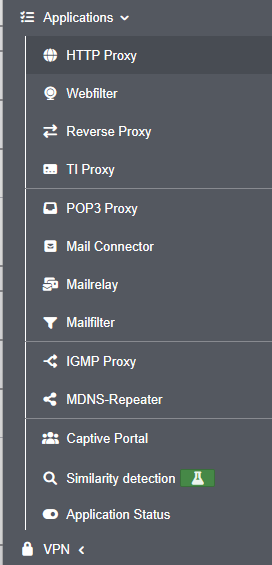
- The content of the "Applications" side menu item has been reorganized and grouped to better reflect logical relationships IDS/IPS has been moved to the Firewall menu, and Nameservers to the Network menu
- The UTMs in a cluster are now labeled "Primary" and "Spare" or — depending on their status—"Active Cluster UTM" and "Passive Cluster UTM"
- A warning message is now displayed when navigating to another page if there are unsaved or invalid entries. This message can be disabled in the advanced settings if desired
- When adding an OAuth 2 connection, certificates can be created without having to exit the Add dialog
- The labeling of the download options in the SSL VPN dialog has been improved
- Entries can now be copied in the tables for network objects, services, Wweb filter profiles, ClientlessVPN, and users

- Miscellaneous
- The minimum length for newly created keys has been increased to 2048 bits
- Services that are disabled in a cluster configuration are re-enabled when the configuration is imported into a device without a cluster license
- The spam report has been visually updated and now adapts better to the requirements of the respective end device
- For the Entra ID directory type, extended attribute names can now be configured in AD/LDAP authentication
- Unknown names within a forward zone can now optionally be resolved via external name servers to improve compatibility with external CNAME targets
- During zero-touch enrollment of a UTM via the USP, an update to the latest UTM version is performed even without an attached configuration
- Bug fixes
- When creating network objects of the types "VPN Host" and "VPN Network," all VPN-related zones are now reliably displayed
- License serial numbers are now correctly displayed in SNMP queries
- When printing a local configuration in Configuration Management, missing values for relay zones, IDS/IPS, and the Alerting Center have been added
- The order of SANs in an ACME certificate can no longer be changed to ensure the certificate’s integrity
- In the packet filter log, temporary ACCEPT entries no longer appear before the final rejection for requests to system-wide blocked destinations
- Tabs for online help and the log are automatically closed as soon as the UTM UI main window is closed
Known_issue
- Known Issue
| Component: | Interface names | Description: | When importing a configuration file for a newly installed and as yet unlicensed UTM, the interface names in the LAN scheme are not correctly mapped to the A/B/C scheme (e.g. LAN1 → A1), meaning that these interfaces can no longer be accessed after a reboot. With the exception of G5 and G6 hardware, the LAN scheme occurs on all systems. |
Workaround: | Import the configuration file via the Configuration Manager once the new UTM has been installed and licensed |
Build 14.1.6
- Release Date: 16.06.2026
- Planned rollout period: 14 days
- Terra Cloud: 24.06.2026
- Planned rollout period: 3 days
Maintenance / Security Bugfixes
- Fixed security vulnerabilities in the Linux kernel
- Fixed a security vulnerability in the nginx reverse proxy
- Updated OpenVPN to version 2.6.20
- Feature
- The "Redirect Gateway" parameter in the SSL-VPN section is set to “Off” by default for new users
- Bugfixes
- SSL-VPN: Adjusting the MSS-Fix value to 1450 resolved connection issues with certain services following OpenVPN updates
- The evaluation of cluster priorities has been corrected. After a failover, the device with the higher priority now automatically assumes the active role again as soon as both cluster nodes are available
- During a one-time update via the Unified Security Portal, the EULA is automatically accepted again, so no further action is required by the user to finalize the process
- The system-wide proxy is now used correctly again in the web filter
- When using the AUTH_GEN_TOKEN function, users were in rare cases assigned incorrect IPs during the OpenVPN connection
- The parameters for lease time and for rejecting unknown clients can be configured again for DHCP
- Segfaults in the nginx reverse proxy have been fixed
- The cluster configuration dialog can only be exited after the save process is complete to ensure that all parameters are fully saved
Build 14.1.5.1
- Release Date: 01.06.2026
- Planned rollout period: 14 days
- Terra Cloud: 15.06.2026
- Planned rollout period: 3 days
- In some cases in cluster environments, devices could no longer be reached via their virtual IP address
- A WAN interface can no longer be mistakenly configured as a cluster HA interface
Known_issue
- Known Issue
| Component: | Cluster activation | Description | Currently, the priority on the passive machine is calculated incorrectly if interfaces are configured with the option Interface is disabled during backup. If one or a small number of interfaces fail, this may therefore lead to restrictions when switching between systems. |
Workaround: | Rollback to 14.1.4 or earlier |
Build 14.1.5
- Release Date: 19.05.2026
Planned rollout period: 14 days
- Terra Cloud: -
- Maintenance / Security Bug Fixes
- Security vulnerabilities in the IPSec service have been addressed (CVE-2026-35328 / Strongswan), (CVE-2026-35329 / Strongswan), (CVE-2026-35331 / Strongswan), (CVE-2026-35332 / Strongswan)
- Features
- Obsolete hash algorithms in SSL-VPN are marked as “not supported” in existing configurations and cannot be selected anymore
- The Alerting Center will now notify users about certificates that use obsolete signature algorithms
- Bug fixes
- In the appliance view of the dashboard, an interface is now correctly displayed as active (with a green border) even when a fallback is configured
- The global email address in the server settings was incorrectly marked as invalid if parts of it resembled untrusted domains
- Segfaults in the keepalived process have been fixed
- Rare instances of high CPU usage caused by the TI proxy have been fixed
- The advanced setting “HTTP and Reverse Proxy File Descriptor” now also applies to the nginx reverse proxy
- Backups are now performed correctly for Hyper-V VSS configurations (Volume Shadow Copy Service)
- The UTM spam report is now MIME-compliant again and no longer triggers spam filters
- Resolution for URL shorteners in the web filter has been optimized. A tooltip provides information on the exact procedure
- LTE connection stabilized – the wwan interface now correctly re-establishes the IPv4 connection after a drop
- Cluster synchronization now works even if the maximum number of configurations has already been reached
Known_issue
- Known Issue
| Component: | Missing virtual IP addresses in cluster environments | Description | In cluster environments, there may be instances where devices can no longer be reached via their virtual IP address | Workaround: | Rollback (or reboot, if the UTM is no longer accessible) |
Build 14.1.4
- Release Date: 07.04.2026
- Planned rollout period: 14 days
- Terra Cloud: 23.04.2026
- Planned rollout period: 3 days
- Features
- An error message in the network tools now alerts the user if domains to be checked contain errors when using the similarity detection
- Bug Fixes
- Due to a change in password processing for clusters, the primary and spare UTMs could switch to active mode simultaneously
- Fixed a critical issue that occurred if an AD server was unreachable during joining
- Fixed rare issues that occurred when downloading UTM configuration files, certificates, or VPN configurations
- Fixed a reverse proxy error, thereby reducing issues with NTLM
- Rules configured with NAT in the packet filter can now be edited again, even if no GeoIP network objects are present
- When selecting the NETMAP type in the NAT configuration, a network object can now be selected again
- Fixed a DynDNS error that caused functionality issues if the configured DynDNS resolver could not be reached via IPv6
- Exceptions for certificate verification are now correctly applied in the transparent proxy
- In isolated cases, trusted domains were blocked in the web filter by the similarity detection feature
- Only a small number of devices could be added to the TI proxy
- The IPS server now starts successfully again
- Older UTM systems could encounter issues during cluster synchronization
- Regex patterns were not saved correctly for newly created email filter rules
- Some mobile connections were terminated after a short time
Build 14.1.3
- Release Date: 09.03.2026
- Planned rollout period: 14 days
- Terra Cloud: -
- Features
- Multi-factor authentication with Entra ID via SSL VPN (OpenVPN) using OpenID Connect (OIDC) is now supported for all standard OpenVPN clients
- Domain blocking triggered by similarity detection can now be temporarily bypassed
Known_issues
- Known Issues
| Component: | AD authentication | Description | After updating to 14.1.3, AD authentication may not work in some environments, even though the connection status display still shows it as active (green control lamp). | Solution: | Two solutions:
|
| Component: | Updates in cluster | Description | Due to a change in password handling for clusters, the master and spare UTMs may switch to active mode at the same time. | Workaround: | To avoid this situation, we recommend the following procedure:
|
| Component: | Reverse proxy under nginx | Description | The reverse proxy may encounter an error and stop processing requests | Workaround: | Rollback to 14.0.12 or earlier (Restarting the firewall or service only helps temporarily) |
| Component: | spDYN update without IPv6 | Description | spDYN does not update when both IPv4 and IPv6 are supposed to be updated, but there is no IPv6 available | Workaround: | Disable spDyn update, select IPv4 only option and re-enable it |
Build 14.1.2.1 Beta version
- Release Date: 24.02.2026
- Planned rollout period: 1 day
- Only available for devices with activated beta updates
The main intention of these versions is to receive valuable feedback from our partners. This feedback is incorporated into the final version of our software before it is delivered to all versions.
We would like to thank all our partners for their support and their contributions to the optimisation of our software.
This version is not intended for use in production environments
Action required:
From March 1, 2026, email classification will only be provided for UTM systems with supported versions.
- With UTM version 14.0.12, we are providing a technically necessary update that ensures continued proper connection to the email classification service.
This is necessary for reliable detection of spam, phishing, and, in some cases, viruses. - Technical changes have been implemented on the backend as part of an adjustment to the service interface.
- To continue using email classification, it is therefore necessary to run UTM on a supported version.
- After installing version 14.0.12, communication with the classification service will continue to function as usual, and incoming emails will be analyzed and categorized as usual.
Therefore, please update to version 14.0.12 by February 28, 2026, at the latest, to ensure continued use of the function without restrictions.
Other changes in this version:
- Maintenance / Security Bugfix
- Update of a Mailfilter component (CVE-2026-25646 / EUVD-2026-7050)
Build 14.1.2 Beta version
- Release Date: 12.02.2026
- Planned rollout period: 1 day
- Only available for devices with activated beta updates
The main intention of these versions is to receive valuable feedback from our partners. This feedback is incorporated into the final version of our software before it is delivered to all versions.
We would like to thank all our partners for their support and their contributions to the optimisation of our software.
This version is not intended for use in production environments
- Maintenance
- Update of the operating system and all components
- Update of OpenVPN to version 2.6.17 (CVE-2025-13086 / EUVD-2025-201102)
- Update of the name server service (CVE-2025-11411 / EUVD-2025-35360)
- Update of a mail filter component
(CVE-2026-22695 / EUVD-2026-2420),
(CVE-2026-22801 / EUVD-2026-2416) - Update of the Securepoint VPN client installer to version 1.0.1
- Update of the mail relay to Postfix version 3.10.7
- New features
- Multi-factor authentication (MFA) with Entra ID via SSL VPN (OpenVPN) is now possible with the help of OpenID Connect
- Features
- The interface assignment and appliance widget have been updated for RC300S G6
- When creating a new configuration profile in the HTTP proxy, the values of the global profile are adopted
- In the nginx reverse proxy, there is an option to enable forwarding of the SNI to the upstream server
- The lifetime for auth tokens can be set for OpenVPN roadwarriors to reduce OTP queries for new connections
- For blocks via GeoIP, the log entry now contains the corresponding country code
- The color blindness mode is applied immediately after login
- The clientless VPN dialog now provides clearer warnings about the lack of security in VNC and RDP connections and suggests optimization options
- MSS clamping for IPv6 has been added
- Bug fixes
- Minor bugs when adding options when setting up a DHCP pool have been fixed
- Domains with umlauts can now also be configured in similarity detection
- Ping check IP fallback routes are no longer considered as internal targets for the HTTP proxy ACL. This means that access to public ping check addresses remains possible even if proxy access to internal destinations is disabled
- When creating a mail connector service, newly added OAuth connections are now correctly transferred to the input mask
- For WWAN/LTE connections, the associated rules are now created completely
- Dynhost rules once again reliably support very long host names
- When creating new network objects, the zone is correctly preselected
- GeoIP network objects are no longer offered for selection in the packet filter during NAT configuration
- The behavior of sites with deny ACLs has been improved
- ACLs containing a space are added correctly
- Creating new users works reliably again
- Registration via the captive portal is working reliably again
- IP validation has been improved
- Fixed a bug in the HTTP Proxy related to Basic Authentication and Captive Portal
Build 14.1.1 Beta version
- Release Date: 18.11.2025
- Planned rollout period: 1 day
- Only available for devices with activated beta updates
The main intention of these versions is to receive valuable feedback from our partners. This feedback is incorporated into the final version of our software before it is delivered to all versions.
We would like to thank all our partners for their support and their contributions to the optimisation of our software.
This version is not intended for use in production environments
- Maintenance
- Update of the kernel to version 6.6
- Update of the HTTP Proxy (Squid) (CVE-2025-62168 / EUVD-2025-34894)
- Fix for a security vulnerability in the IPSec service (CVE-2025-62291)
- Updates to the appliance images for expansion slots with 2 ports
- New Features
- Similarity Detection (Experimental Feature )
- To minimize phishing attacks and fraud attempts in the Web Filter and Mail Filter, suspicious domains that show a strong similarity to known trusted domains can be marked and/or blocked. Trusted domains can be added individually in the new application menu for similarity detection.
- A domain can be tested against the Similarity Detection via the Network Tools and via the CLI
- A dialog shown at login explains the new feature and points to the corresponding menu entry
- Features
- USC Zero Touch
- Before Zero Touch enrollment of a UTM via the USC, an automatic update to the current UTM version is now performed if a configuration has been uploaded
- The UTM console and the USC display the individual steps of the enrollment process in detail
- Clientless VPN
- When configuring a connection, user groups can now be selected directly and displayed in the table
- If a connection is opened using the “Advanced Fullscreen” button, ESC can be used on the connected device
- The overview table of connections has been extended with several additional information fields
- SSL VPN
- The previous VPN Client (version 2.0.45) has been replaced by version 1.0 of the new VPN Client Installer (for client version 3.3.3)
- Mailrelay
- Outgoing IP addresses can now be specified separately for IPv4 and IPv6
- In the Mail Relay, a new switch Resolve unknown numeric domains has been added to prevent rejection by the mail relay
- Administration Interface
- The statistics widgets on the dashboard now offer more and improved interaction and analysis options
- In the Reverse Proxy and the Network Topology, nested tables can now be sorted independently
- Different HTTP Proxy configurations can now be created for different internal networks
- The modal Network Tools dialog has been improved (tooltip, accessibility via the search function, inclusion in the UTM tour, saving of the window position)
- In the Network Configuration, all standardized DHCP options can now be configured when setting up a DHCP pool
- By double-clicking the drag-and-drop icon of a table entry, the desired target position can be entered directly
- A confirmation dialog now always appears when opening external links
- The download process for multiple local configurations has been revised and made more intuitive
- In the Reverse Proxy, server groups and sites are now displayed in a single combined table
- To better distinguish between multiple open UTM interfaces, the browser title now includes information about the hostname and version while logged in (full version in the Admin UI, major version in the User UI). If the user is not logged in, only the major version is shown and no hostname
- Additional Features
- When assigning a PIN for access to the Unified Security Console, only the relevant patterns are now displayed for PINs classified as weak
- The process for creating a support user has been optimized and aligned with similar workflows
- When creating packet captures, a tooltip now points out the functionality of the slider for name resolution
- In the Packet Filter, a warning triangle indicates a potential source of error when a node with a hostname is used in a port forwarding rule
- The Mail Filter has been extended with new rule options to control how encrypted and unencrypted archives in incoming emails are handled
- The button for importing an additional configuration in the Cloud Backup is now grayed out once the maximum number of 20 configurations is reached
- Notifications from devices with eMMC storage are now also sent via the Alerting Center
- Deprecated key lengths (1024-bit and below) and ciphers (SHA1) are temporarily accepted again. This allows the HTTP Proxy and SSL VPN to continue to be used
- The unloading of helpers for services used in the rule set has been removed, as helpers should only be managed through the service settings
- Bugfixes
- Inconsistencies in the behavior of the button for enabling and disabling the implied rule in the WireGuard dialog have been corrected
- When importing a WireGuard configuration, the MTU is now read correctly
- The table search function now also finds entries in collapsed groups
- In the Reverse Proxy, issues with drag & drop and deleting entries have been fixed
- Tab completion in the CLI now correctly shows all available commands and options again during multi-line input
- The warning message for static DHCP leases at login has been adjusted
- When a hostname was used instead of an IP address, logs were sometimes not sent to the Syslog server after a reboot
- The description field of Packet Filter rules is now correctly included when downloading the configuration file as a PDF
- Transparent rules in the HTTP Proxy/POP3 Proxy always require the selection of a destination network object
- The log of the DynDNS function for a network interface is now evaluated correctly
- The legend of the email statistics in the User UI is now easier to read in dark mode
- Before reboot and rollback/dry run, the user is now properly logged out again
- A bond interface can now also be configured as the outgoing IP address in the HTTP Proxy
- Issues when configuring bond interfaces across different slots have been resolved
- Support users with root privileges again have full SSH permissions
- In the Network Topology, the assignment of dynamic DHCP leases to pools is now displayed correctly again
- Performance in user configuration has been significantly improved
- A bug in automatic QoS that caused configured bandwidth limits not to be applied in version 14.1.0 Beta has been fixed
- All license-related events are once again forwarded to the Alerting Center
- In Beta version 14.1.0, the service establishing the connection to the Securepoint Cloud malfunctioned after long runtimes due to an issue with file descriptors not being closed
- When creating a Web Filter rule of type URL, wildcards and protocols are now accepted again
- Display issues in the configuration of the Smarthost in the Mail Relay have been fixed
- When using a RADIUS server to authenticate VPN connections, OTP prompts could lead to long waiting times
Known_issues
- Known Issues
| Component: | Description | Workaround: | |||
| Component: | Description | Workaround: | |||
| Component: | Description | Workaround: |
Build 14.1.0 Beta version
- Release Date: 26.08.2025
- Planned rollout period: 1 day
- Only available for devices with activated beta updates
The main intention of these versions is to receive valuable feedback from our partners. This feedback is incorporated into the final version of our software before it is delivered to all versions.
We would like to thank all our partners for their support and their contributions to the optimisation of our software.
This version is not intended for use in production environments
- Maintenance
- Update of the operating system and all components
- Update of the SSL-VPN and Mail Connector components
- Update of the Bird routing daemon for the BGP and OSPF protocols (intended for complex infrastructures only).
Configuration file adjustments are required.
- New Features
- A new dialog for creating packet captures has been added
- Cloud Shield can now also be configured for UTMs via the USP
- A Cloud Shield configuration can be deleted via permissions if access through the USC is not possible
- Features
- TI Proxy
- TI Proxy now supports multiple networks
- USC
- Additional permissions can be set for editing the UTM via the USC
- If a VPN configuration or Cloud Shield configuration exists, permission for these items cannot be revoked
- Update actions via the USC are PIN-protected
- Network
- With the LTE kit, both IPv4 and IPv6 addresses can now be used for connectivity
- The DHCP section of the network configuration dialog for IPv4 and IPv6 has been redesigned to make dependencies clearer
- The cluster wizard has been revised and now also suggests WireGuard interfaces for deactivation
- In the cluster configuration, the application status on the spare is displayed more clearly
- Network tools can now be configured via a modal dialog so that the current dialog does not need to be exited
- Mailrelay
- OAuth 2.0 can be used for authentication when sending emails via smarthosts
- With SASL authentication in the mail relay, it can also be checked whether the technical sender (envelope sender) matches the authenticated user ID
- Packet Filter
- Info icons and NAT type descriptions have been added to improve understanding when editing packet filter rules
- The format of packet filter log messages in nftables has been adjusted to simplify subsequent assignment to packet filter rules
- Authentication
- When adding an ACME certificate, an alternative certificate chain can be selected to avoid issues with outdated certificates delivered by Let’s Encrypt
- ACME certificates can now be created with elliptic curve keys
- In user management, the permissions assigned to a user are displayed as icons
- The encryption dialog has been revised and options for TLS 1.3 cipher suites have been added
- Reverse Proxy
- Similar to the Squid reverse proxy, anonymization can now also be enabled in the nginx reverse proxy
- For ACL sets in the reverse proxy, it can be specified whether case sensitivity should be enforced or ignored
- Configuration Management
- After a new installation and after activating a backup, an initial password change is enforced
- Multiple configurations can be downloaded at once. The number of configurations that can be stored has been limited to 20
- Other
- Display and handling of emails in the user interface has been significantly accelerated
- Log messages can also be filtered by packet filter groups
- For IPSec connections, encapsulation of ESP packets in UDP can be enforced to avoid communication issues with VPN connections to third-party devices
- Fastdiff and SigQA functionality of the virus scanner are enabled by default to detect new threats more effectively
- In addition to the link to the wiki, the current changelog itself can also be viewed under firmware updates
- In the CLI, there is a new context menu for copying request and response
- Internationalized domain names (e.g. with umlauts) can also be entered in the web filter
- Since the IPv4 peer address in a user’s WireGuard configuration refers to the shared IP addresses from the UTM’s perspective and is therefore not exported, the tooltip explicitly points this out
- The online help has been revised
- For more consistent handling, adding and editing elements in the web filter and mail relay dialogs have been moved into separate dialogs
- The HTTP proxy statistics in the Admin UI have been completely revised and expanded
- Bugfixes
- When the UTM is reset to factory settings, a new Zero Touch Enrollment PIN is automatically generated
- Entra integration works reliably even after multiple deactivations and reactivations
- All errors that may occur when applying a cloud backup are caught and displayed
- Issues when moving packet filter rules and groups have been fixed
- When a service on a spare UTM is explicitly stopped, the tooltip displays this correctly
- The synchronization status in a cluster is always reliably displayed on both cluster UTMs
- Special characters in passwords no longer cause problems in cluster communication
- Arguments in the CLI may now also include equal signs
- If the CA certificate for SSL interception of the HTTP proxy is changed, connections can be successfully established with the new certificate
- The save button now reliably indicates every pending change
- Deleted Entra ID users are permanently removed and not just marked as deleted
Known_issues
- Known Issues
| Component: | email archive | Description | In the email archive, messages are currently counted incorrectly, causing too many (partly empty) pages and incorrect hit counts in the filters to be displayed | Workaround: | |
| Component: | SIP module | Description | If packet filter rules exist with the sip service (SIP helper) and the corresponding SIP helper modules have been disabled debug kmod unload module nf_x_y As a result, the UTM may become unreachable. |
Workaround: | Remove the required SIP helper modules from the block list via the CLI. The command debug kmod delete removes the modules from the block list after a reboot. This allows them to be loaded automatically by the packet filter rule if necessary. The error no longer occurs. cli> debug kmod delete module nf_nat_sip debug kmod delete module nf_nat_h323 debug kmod delete module nf_conntrack_sip debug kmod delete module nf_conntrack_h323 OK cli>sytem reboot |
| Component: | HTTP-Proxy / SSL-VPN | Description | Keys that are 1024 bits or smaller or created with sha1 are not accepted. This can result in services that use such keys not working. Constant restarting increases the load, so that the UTM becomes unusable after a while (<½h). |
Workaround: | Replace all old, insecure keys with current keys with the recommended length of 3072 bits or longer. |
| Component: | QoS | Description | Configured automatic QoS does not apply the stored settings | Workaround: |
Build 14.0.12
- Release Date: 19.02.2026
- Planned rollout period: 4 days
- Terra Cloud: 19.02.2026
- Planned rollout period: 4 days
Action required:
From March 1, 2026, email classification will only be provided for UTM systems with supported versions.
- With UTM version 14.0.12, we are providing a technically necessary update that ensures continued proper connection to the email classification service.
This is necessary for reliable detection of spam, phishing, and, in some cases, viruses. - Technical changes have been implemented on the backend as part of an adjustment to the service interface.
- To continue using email classification, it is therefore necessary to run UTM on a supported version.
- After installing version 14.0.12, communication with the classification service will continue to function as usual, and incoming emails will be analyzed and categorized as usual.
Therefore, please update to version 14.0.12 by February 28, 2026, at the latest, to ensure continued use of the function without restrictions.
Other changes in this version:
- Maintenance / Security Bugfix
- Update of a Mailfilter component (CVE-2026-25646 / EUVD-2026-7050)
Build 14.0.11
- Release Date: 03.02.2026
- Planned rollout period: 7 days
- Terra Cloud: 11.02.2026
- Planned rollout period: 3 days
- Security Bugfix / Maintenance
- Update of a Mailfilter component (CVE-2026-22695 / EUVD-2026-2420) / (CVE-2026-22801 / EUVD-2026-2416)
- Update of OpenSSL (CVE-2025-15467 / (EUVD-2025-206379)
Build 14.0.10
- Release Date: 07.01.9026
- Planned rollout period: 7 days
- Terra Cloud: 13.01.2026
- Planned rollout period: 3 days
- Security Bugfix / Maintenance
- Update of nameserver service (CVE-2025-11411)
Build 14.0.9.2
- Release Date: 04.11.2025
- Planned rollout period: 7 days
- Security Bugfix / Maintenance
- The clientless VPN dialog now provides clearer warnings about the lack of security of VNC and RDP connections and possible optimization options
- Hardening of clientless VPN security
- Fixing a security vulnerability in the IPSec service (CVE-2025-62291)
Build 14.0.9.1
- Release Date: 22.10.2025
- Planned rollout period: 7 days
Update of http proxy (squid) (CVE-2025-62168 / EUVD-2025-34894)
Build 14.0.9
- Release Date: 07.10.2025
- Planned rollout period: 14 days
- Feature
- The TI Proxy now supports terminals connected to different local networks
- Bugfixes
- Fixed an issue where VLAN interfaces were created incorrectly when updating from version 14.0.6 to 14.0.7.1
- Fixed errors when starting cloud backups after a license exchange
- UTMs without network object groups can now be integrated into a VPN configuration in the USC
- License terms in firmware updates are now displayed without delay
- Dropdown menus and emails in the user interface are now more readable in dark mode
Known_issue
- Known Issue
| Component: | OpenVPN / SSL-VPN | Description | We are currently investigating issues with OpenVPN Roadwarrior tunnels using Radius authentication. | Workaround: | - |
Build 14.0.8.2
- Release Date: 18.08.2025
- Planned rollout period: 7 days
- Maintenance / Security
- Update libarchive to version 3.8.1 (CVE-2025-5914 / EUVD-2025-17572)
- Bugfix
- Fixes an ssue in the TI proxy that caused updates to fail on card terminals in some circumstances
Build 14.0.7.1
- Release Date: 16.07.2025
- Planned rollout period: 14 days
- Features
- Accurate diagrams for new UTM models have been added
- If the delivery password has not yet been changed, the password change is now forced during the web interface login
- Bugfixes
- The risk that the Zero Touch Enrollment PIN is not saved during an uncontrolled reboot/shutdown during installation has been minimised.
If the PIN is still lost, a new PIN is generated and displayed on the UTM console
Build 14.0.6
- Release Date: 12.06.2025
- Planned rollout period: 14 days
- Features
- Accurate diagrams for new UTM models have been added
- Potentially security-critical data in the configuration report is now unrecognisable
Known_issues
- Known Issues
| Component: | Zero-touch enrollment PIN | Description | When resetting to factory settings, the enrollment PIN for Zero-Touch is not regenerated | Workaround: | A new enrollment PIN is generated during a complete reinstallation via USB stick |
Build 14.0.5
- Release Date: 21.05.2025
- Planned rollout period: 14 days
- Maintenance
- VPN Client has been updated to 2.0.44
- Features*
- The name of the configured certificate is now displayed in the sites table of the reverse proxy dialogue. In case of warnings, this name is highlighted in red and is provided with an explanatory tooltip
- There is a new note to the user that a restart of the UTM is necessary to fully activate a configuration
- Bugfixes
- Temporary files in the nginx reverse proxy are now reliably deleted regularly to avoid excessive memory consumption
- When deactivating the transparent mode in the HTTP proxy, the error 'error in implied rules' is now prevented
- When creating packet filter rules, an incorrectly saved empty string overwrote the ID with an empty log alias
- The nginx version used was removed from the reverse proxy header for security reasons
- Rules created and deleted via the USP no longer cause rules to be displayed in the wrong groups in the frontend
- Rule-based routing is once again correctly evaluated before tunnel routes in SSLVPN site-to-site tunnels
Build 14.0.4
- Release Date: 15.04.2025
- Planned rollout period: 14 days
- Features
- A new wizard simplifies the configuration of a TI proxy connection
- In the cluster configuration, a tooltip explains the use of the remote peer's SSH key
- The user is now more clearly informed of possible misconfigurations when configuring the reverse proxy
- Bugfixes
- In rare cases, valid domains were blocked by the HTTP proxy
- Very rarely problems occurred when establishing the web session via the Unified Security Portal
- Display problems when switching from and to the packet filter dialogue have been fixed
- If inconsistencies occur in the VPN configuration via the Unified Security Portal, these are now intercepted more smoothly in the backend and packet filter UI
- Display problems with the protected addresses in the DNS rebind prevention of the name server have been fixed
- A UTM now obtains an IP via DHCP again after a restart, even if a fallback is configured on an external interface
Build 14.0.3
- Release Date: 26.03.2025
- Planned rollout period: 14 days
- Features
- There is a new extc variable ‘MAXLEASES’ for setting the maximum number of DHCP leases via the advanced settings
- The default value for the encryption algorithm (‘Cipher for data connection’ field) for SSL VPN connections has been updated to AES-256-GCM
- The login screen for the new Luna design has been adapted to the existing layout
- Bugfixes
- The mouseover text for the target port for services in the packet filter has been corrected
- Changes to the DHCP relay settings made via the configuration interface are now applied correctly
- The error message when moving rules and rule groups in the packet filter is now more informative
- The DHCP client now always requests a new IP address after an interface update to ensure a seamless connection when changing the network
- After switching off the HTTP proxy, devices from the internal network can still access the Internet according to the configured rules
- Even if a WireGuard connection has been created via the cloud, additional local WireGuard tunnels can now be added
- The name of a local configuration for cloud backups may now also contain umlauts
- The tab completion in the CLI is available again
- The HTTP proxy statistics correctly fill the entire popup window again
- Display problems in the e-mail administration have been fixed
- Ordered lists are displayed correctly again in e-mail details
- Icons on buttons are displayed reliably again in the admin interface
- The values from the extc variable CHALLENGE_DNS_SERVERS are now retained during updates
- In rare cases there were connection problems to the USC due to missing updates from the license server. These problems have been fixed
Known_issues
- Known Issues
| Affected component | Description | Workaround |
|---|---|---|
| HTTP Proxy as of v14.0.2 |
Problems with unsupported protocols An update of the Squid engine leads to an error with unsupported protocols. |
Create exclude rule in HTTP proxy Under button create a network object with the type: . Specify the site that leads to the error as the host name.
At Area Transparenter Modus button If this does not help, please open a support ticket. |
| DHCP service | An interface does not receive an IP address via DHCP if a fallback is configured at the same time. | Assign a fixed IP address on the interface. |
Build 14.0.2
- Release Date: 26.02.2025
- Planned rollout period: 14 days
- Maintenance / Security Bugfixes
- Mail relay has been updated to Postfix version 3.7.12
- SSH service has been updated to version 9.9p2 (CVE-2025-26465), (CVE-2025-26466)
- Features
- New popup window during login to activate the use of beta versions
- The login screen has been adapted to the new Luna design
- Bugfixes
- Fixed an internal error that prevented administration via Admin UI/CLI in some cases
- Virus findings in the HTTP proxy are reported via the Alerting Center again
- The MIME type blocklist in the HTTP proxy has been optimised
- Mails containing links with incorrectly formatted href tags are no longer temporarily rejected
- The log level for timeouts in the mail scanner has been reduced from ERROR to INFO in order to reduce unnecessary warnings via the Alerting Center
- When importing a new licence file via the web session, a message is now displayed that the web session window will be closed and the session will expire shortly afterwards
- Fixed a bug that prevented the addition of an Ethernet interface
- IPSec tunnel networks were sometimes displayed incorrectly if the corresponding tunnel was not established
- In addition, all changes from the Reseller Previews and Beta Versions are included:
- Maintenance
- This version is distributed as a beta version
It is only available for versions with the Reseller Preview v14.0.1 and activated beta updates - Update of the operating system and all components
- DHCP transition widget has been removed
- Maintenance / Security / Operating System
- Update of the Squid service
- DNS has been updated with a new service with additional functions
- Feature
- New Features:
- Reseller previews are replaced by the beta program and can now be downloaded optionally
- As of the upcoming USP Portal 2.0 beta, VPN configurations can be published on appliances
- VPN configuration from the USC can be deactivated in the USP dialog
- Alert added if a database conversion problem occurs during a configuration import
- Connection of card terminals is possible with the new TI proxy
- New wizard for cluster configurations available
- Administration web interface:
- Wireguard connections can now be deactivated
- E-mail management has been optimized in the user interface
- DNS Forwarding can now be configured in the installation wizard
- Tables can now be displayed in additional styles, have paging, maximum height settings and an associated configuration menu
- A new dialog for configuring the global table settings has been added to the navigation
- For expandable tables, which entries are expanded is persisted
- Tables retain their scroll position and their current page even when reloaded
- Tables are now loaded much more efficiently - especially when paging is active
- It is ensured that cell contents are always in the visible area when scrolling
- extc Runtimevars can be viewed in the advanced settings
- Interface options for duplex and speed are always visible
- The applied filter rule/selector is now also displayed for accepted mails
- Multiple NTP servers are configurable
- General system information and log files can be downloaded as a compressed file directly in the support user dialog
- The source IP can be selected in the traceroute network tool
- Warnings about unsynchronized clusters are displayed
- Rules can be assigned aliases that can be used to filter the weblog
- Display of inherited user authorizations has been extended
- The MDNS repeater now has its own menu entry in the applications
- The mail filter can now be activated in more dialogs
- Automatic generation of OTP codes has been optimized
- Multiple emails can be selected and tagged simultaneously in the user interface (#39176)
- The tour has been moved to the configuration dialog
- Alerting Center:
- Alerts are displayed in the top right of the admin interface
- Alerts for bond interface events have been added
- Other:
- The CLI via SSH has a persistent history
- IP addresses for the ACL type “dstdomain” can be set again for reverse proxy
- New SNMP OIDs for monitoring the cluster status have been added
- VPN configurations can be downloaded with embedded certificates
- Geo IP blocking has been moved to the IDS / IPS menu
- System-wide blocking of IP addresses is now available under IDS / IPS-->
- ACLs in the reverse proxy are now validated
- Wireguard interfaces are marked and deactivated for cluster spares in backup mode
- Fallback interfaces are only used as fallback if they are also online
- Grouping of subnet combinations can be deactivated in the IPSec Wizard
- Cluster dialog has been redesigned
- Bugfixes
- Update finalization messages have been removed from syslog when the Unified Security Report is enabled
- VPN configurations set up via Unified Security Console are now completely deleted
- Loading times of the HTTP proxy dialog have been optimized
- Wake on LAN (WOL) has been further optimized
- Fixed incorrect behavior of the Alerting Center test report function
- Sorting of network objects in the administration web interface has been optimized
- Under certain circumstances, the clipboard was no longer functional for clientless VPN connections
- SASL authentication was activated on the mail relay even if no users had the corresponding rights
- Search in email management is now case insensitive
- Nginx reverse proxy responds to non-existent pages with status code 403 instead of 500
- DHCP pool customization via SPCLI was only executable once
- Fixed a bug that caused an incomplete DHCP relay configuration to be created after restart
- The vendor options were not processed correctly on the DHCP server under certain circumstances
- A memory leak in the SSL interception function of the HTTP proxy has been fixed
- WLAN widget no longer worked correctly
- The spupdater service could not process the update server status message correctly
- Central service of the firewall generated a segfault
- HTTP Proxy service did not start if invalid regex entries were configured
- Minor visual user interface bugs and hints have been adjusted
- No new license could be imported via a web session
- Inheritance of group permissions and attributes has been revised
- Virtual IPs were not removed correctly when reconfiguring clusters
- Error message in case of failed cluster synchronization with different UTM versions has been revised
- Web sessions could be canceled under certain circumstances if the appliance responded with a delay
- Unnecessary alarm messages on unopened ports with nftables have been fixed
Known_issues
- Known Issue
| Affected component | Description | Workaround |
|---|---|---|
| DHCP-Server | The service for the DHCP server is limited to 1000 leases by default. If this number is reached without older leases being unlocked, no more DHCP leases are distributed. |
Open a ticket in Support to edit a template |
| VPN | If a WireGuard connection has been created via the cloud, no further local WireGuard tunnels can be added | - |
| Cloud-Backup | An umlaut (ä, ö, or ü) in the name of the local configuration prevents a successful cloud backup. | |
| ACME Certificate Update | After updating to 14.0.1 or 14.0.2, problems may occur in the ACME certificate update if the “system-wide name servers for ACME challenges” were not used. The reason for this is an error in the update script, which deletes values from the extc variable CHALLENGE_DNS_SERVERS. |
Menu Area ACME Option Use system-wide nameservers for ACME challenges {{#var\:no}} disable and enter the original value in the click box »203.0.113.113 under the option Nameservers for ACME Challenges. ( Adjust the IP address!) (See also the wiki on ACME Certificates) Alternatively: |
Build 14.0.1.1 Beta version
- Release Date: 11.02.2024
- Planned rollout period: 1 day
- Only available for devices with activated beta updates
The main intention of these versions is to receive valuable feedback from our partners. This feedback is incorporated into the final version of our software before it is delivered to all versions.
We would like to thank all our partners for their support and their contributions to the optimisation of our software.
This version is not intended for use in production environments
- Maintenance
- This version is distributed as a beta version
It is only available for versions with the Reseller Preview v14.0.1 and activated beta updates
- Bugfixes
- Update finalization messages have been removed from syslog when the Unified Security Report is enabled
- VPN configurations set up via Unified Security Console are now completely deleted
- Loading times of the HTTP proxy dialog have been optimized
Known_issue
- Known Issue
| Affected component | Description | Workaround |
|---|---|---|
| Admin interface: Creating Ethernet interfaces | When creating Ethernet interfaces, the UI may no longer respond to inputs | Creating interface with the CLI |
Build 14.0.1 Reseller Preview
- Release Date: 30.01.2024
- Planned rollout period: 1 day
- Available only für devices with nfr license
These Reseller Previews are beta versions of our software. The main intention of these versions is to receive valuable feedback from our partners. This feedback is incorporated into the final version of our software before it is delivered to end customers.
We would like to thank all our partners for their support and their contributions to the optimisation of our software.
This version is not intended for use in production environments
- Maintenance
- Update of the operating system and all components
- DHCP transition widget has been removed
- New Features:
- Reseller previews are replaced by the beta program and can now be downloaded optionally
- Administration web interface:
- Wireguard connections can now be deactivated
- E-mail management has been optimized in the user interface
- DNS Forwarding can now be configured in the installation wizard
- Other:
- The CLI via SSH has a persistent history
- IP addresses for the ACL type “dstdomain” can be set again for reverse proxy
- New SNMP OIDs for monitoring the cluster status have been added
- VPN configurations can be downloaded with embedded certificates
- Geo IP blocking has been moved to the IDS / IPS menu
- System-wide blocking of IP addresses is now available under IDS / IPS-->
- Bugfixes
- Wake on LAN (WOL) has been further optimized
- Fixed incorrect behavior of the Alerting Center test report function
- Sorting of network objects in the administration web interface has been optimized
- Under certain circumstances, the clipboard was no longer functional for clientless VPN connections
- SASL authentication was activated on the mail relay even if no users had the corresponding rights
- Search in email management is now case insensitive
- Nginx reverse proxy responds to non-existent pages with status code 403 instead of 500
- DHCP pool customization via SPCLI was only executable once
- Fixed a bug that caused an incomplete DHCP relay configuration to be created after restart
- The vendor options were not processed correctly on the DHCP server under certain circumstances
Build 14.0.0.2 Reseller Preview
- Release Date: 09.12.2024
- Planned rollout period: 1 day
- Available only für devices with nfr license
These Reseller Previews are beta versions of our software. The main intention of these versions is to receive valuable feedback from our partners. This feedback is incorporated into the final version of our software before it is delivered to end customers.
We would like to thank all our partners for their support and their contributions to the optimisation of our software.
This version is not intended for use in production environments
- A memory leak in the SSL interception function of the HTTP proxy has been fixed
Known_issues
- Known Issues
| Affected component | Description | Workaround |
|---|---|---|
| DHCP Relay v12.7.4 |
The DHCP relay does not start if a DHCP pool is not also defined. | Create any (unused) DHCP pool |
Build 14.0.0.1 Reseller Preview
- Release Date: 2.12.2024
- Planned rollout period: 1 day
- Available only für devices with nfr license
These Reseller Previews are beta versions of our software. The main intention of these versions is to receive valuable feedback from our partners. This feedback is incorporated into the final version of our software before it is delivered to end customers.
We would like to thank all our partners for their support and their contributions to the optimisation of our software.
This version is not intended for use in production environments
- WLAN widget no longer worked correctly
- The spupdater service could not process the update server status message correctly
- Central service of the firewall generated a segfault
- HTTP Proxy service did not start if invalid regex entries were configured
Known_issues
- Known Issues
| Affected component | Description | Workaround |
|---|---|---|
| DHCP Relay v12.7.4 |
The DHCP relay does not start if a DHCP pool is not also defined. | Create any (unused) DHCP pool |
Build 14.0 Reseller Preview
- Release Date: 25.11.2024
- Planned rollout period: 1 day
- Available only für devices with nfr license
These Reseller Previews are beta versions of our software. The main intention of these versions is to receive valuable feedback from our partners. This feedback is incorporated into the final version of our software before it is delivered to end customers.
We would like to thank all our partners for their support and their contributions to the optimisation of our software.
This version is not intended for use in production environments
- Maintenance / Security / Operating System
- Update of the Squid service
- DNS has been updated with a new service with additional functions
- Feature
- As of the upcoming USP Portal 2.0 beta, VPN configurations can be published on appliances
- VPN configuration from the USC can be deactivated in the USP dialog
- Alert added if a database conversion problem occurs during a configuration import
- Connection of card terminals is possible with the new TI proxy
- New wizard for cluster configurations available
- Administration web interface:
- Tables can now be displayed in additional styles, have paging, maximum height settings and an associated configuration menu
- A new dialog for configuring the global table settings has been added to the navigation
- For expandable tables, which entries are expanded is persisted
- Tables retain their scroll position and their current page even when reloaded
- Tables are now loaded much more efficiently - especially when paging is active
- It is ensured that cell contents are always in the visible area when scrolling
- extc Runtimevars can be viewed in the advanced settings
- Interface options for duplex and speed are always visible
- The applied filter rule/selector is now also displayed for accepted mails
- Multiple NTP servers are configurable
- General system information and log files can be downloaded as a compressed file directly in the support user dialog
- The source IP can be selected in the traceroute network tool
- Warnings about unsynchronized clusters are displayed
- Rules can be assigned aliases that can be used to filter the weblog
- Display of inherited user authorizations has been extended
- The MDNS repeater now has its own menu entry in the applications
- The mail filter can now be activated in more dialogs
- Automatic generation of OTP codes has been optimized
- Multiple emails can be selected and tagged simultaneously in the user interface (#39176)
- The tour has been moved to the configuration dialog
- Alerting Center:
- Alerts are displayed in the top right of the admin interface
- Alerts for bond interface events have been added
- Other:
- ACLs in the reverse proxy are now validated
- Wireguard interfaces are marked and deactivated for cluster spares in backup mode
- Fallback interfaces are only used as fallback if they are also online
- Grouping of subnet combinations can be deactivated in the IPSec Wizard
- Cluster dialog has been redesigned
- Bugfixes
- Minor visual user interface bugs and hints have been adjusted
- No new license could be imported via a web session
- Inheritance of group permissions and attributes has been revised
- Virtual IPs were not removed correctly when reconfiguring clusters
- Error message in case of failed cluster synchronization with different UTM versions has been revised
- Web sessions could be canceled under certain circumstances if the appliance responded with a delay
- Unnecessary alarm messages on unopened ports with nftables have been fixed
Known_issues
- Known Issues
| Affected component | Description | Workaround |
|---|---|---|
| DHCP Relay v12.7.4 |
The DHCP relay does not start if a DHCP pool is not also defined. | Create any (unused) DHCP pool |
Securepoint UTM v12
Securepoint UTM v12Securepoint UTM v11
Securepoint UTM v11
Securepoint UTM v10
Securepoint UTM v10