Keine Bearbeitungszusammenfassung |
KKeine Bearbeitungszusammenfassung |
||
| (151 dazwischenliegende Versionen von 6 Benutzern werden nicht angezeigt) | |||
| Zeile 1: | Zeile 1: | ||
{{Set_lang}} | {{Set_lang}} | ||
<templatestyles src="Vorlage:Styles-Startseiten.css" /> | |||
{{#vardefine:headerIcon|spicon-utm}} | {{#vardefine:headerIcon|spicon-utm}} | ||
{{:UTM.lang}} | |||
{{var2 | neu--Beta | |||
| Neue Beta-Version | |||
| New beta version }} | |||
{{var2 | neu--Public | |||
| Neue Public-Version | |||
| New public version }} | |||
{{var2 | neu ab | |||
| Neu ab | |||
| New as of }} | |||
{{var2 | neu--Ort Nameserver | |||
| Neuer Ort im Menü: [[#Netzwerk | Netzwerk]] | |||
| New location in the menu: [[#Network | Network]] }} | |||
{{var2 | neu--Ort IDS | |||
| Neuer Ort im Menü: [[#Firewall | Firewall]] | |||
| New location in the menu: [[#Firewall | Firewall]] }} | |||
{{var2 | 1=14.2 Block 1 | |||
| 2=;Neue Features | |||
* Admin- und User-Frontend der UTM stehen nun auch in [[UTM/Sprachauswahl|polnischer Sprache zur Verfügung]] (experimentell). | |||
* Im Verschlüsselungs-Dialog kann jetzt [[UTM/AUTH/Verschl%C3%BCsselung|der Sicherheitsmodus gesetzt werden]] - bei Bedarf werden Zertifikate markiert, die ein bestimmtes Sicherheitslevel unterschreiten | |||
* In allen Dialogen, die Tabellen enthalten, kann nun eine [[UTM/Erweiterte_Suche|spaltenspezifische Suchfunktion genutzt werden]] | |||
;Features | |||
:Cluster | |||
* In einem Cluster stehen die [[UTM/CONFIG/Konfigurationsverwaltung#Weitere_Bereiche|Konfigurationen für Primary und Spare nun auf beiden Geräten zum Download zur Verfügung]] | |||
* Im Cluster Assistenten können [[UTM/NET/Cluster#Cluster-Konfiguration|für mehrere Schnittstellen virtuelle IPs anlegt werden]] | |||
:HTTP-Proxy | |||
* Das [[UTM/APP/HTTP_Proxy#Log | Logging des HTTP-Proxy-Caches]] wurde erweitert | |||
* Im HTTP-Proxy kann die [[UTM/APP/HTTP_Proxy#Erweitert|Anzahl der Threads konfiguriert werden]] | |||
:Mailfilter | |||
* Im Mailfilter [[UTM/APP/Mailfilter#Fehlerbehandlung|kann konfiguriert werden, ob und wann eine E-Mail erneut gescannt werden soll]] | |||
* Unterscheidung zwischen [[UTM/APP/Mailfilter#Kriterien| dem technischen und dem sichtbaren Absender im Mailfilter]] | |||
| 3=;New features | |||
* The UTM admin and user frontends are now [[UTM/Sprachauswahl|also available in Polish]] (experimental). The language does not switch automatically based on the browser. Use the URL parameter "lang=pl-beta".<br> | |||
Example: <nowiki>https://192.168.175.1:11115/?lang=pl-beta</nowiki> | |||
* Security mode can now be set [[UTM/AUTH/Verschl%C3%BCsselung|in the encryption dialog]]. In the certificate dialog, certificates that fall below a certain security level are flagged, if configured accordingly | |||
* A [[UTM/Erweiterte_Suche|column-specific search function]] can now be used in all dialogs that contain tables | |||
;Features | |||
:Cluster | |||
* In a cluster, the configurations for the primary and spare devices are now [[UTM/CONFIG/Konfigurationsverwaltung#Weitere_Bereiche|available for download on both devices]] | |||
* The mail archive is now synchronized across both machines in the cluster | |||
* To facilitate the transition from existing UTMs to cluster UTMs, users can now [[UTM/NET/Cluster#Cluster-Konfiguration|create virtual IPs for multiple interfaces or convert existing IPs in the Cluster Wizard]] | |||
:HTTP Proxy | |||
* [[UTM/APP/HTTP_Proxy#Log|HTTP proxy cache logging has been enhanced]]. Debug logs can now be enabled specifically for selected areas and detail levels to facilitate the analysis of complex or sporadic proxy issues | |||
* The [[UTM/APP/HTTP_Proxy#Erweitert|number of threads in the HTTP proxy can now be configured]] | |||
:Mailfilter | |||
* When resending an email from quarantine, the global admin email address is now used as the sender | |||
* In the mail filter settings, you can configure [[UTM/APP/Mailfilter#Fehlerbehandlung|whether and when an email should be scanned again if an error occurred during initial processing]] | |||
* When adding filter rules in the mail filter, you can [[UTM/APP/Mailfilter#Kriterien|distinguish between the technical and the visible sender]] | |||
:Mailrelay | |||
* The [[UTM/APP/Mailrelay#Allgemein|DKIM result "policy" can be used for filter rules]]. Additionally, accepted DKIM algorithms and minimum key lengths can be configured individually | |||
* TLS requirements can [[UTM/APP/Mailrelay#Relaying|be configured per domain/hostname]] | |||
}} | |||
{{var2 | 1=14.2 Block 2 | |||
| 2= | |||
:Mailrelay | |||
* Filtermöglichkeiten für [[UTM/APP/Mailrelay#Allgemein|DKIM-Ergebnis „policy“]] | |||
* TLS-Anforderungen können [[UTM/APP/Mailrelay#Relaying|pro Domain/Hostname konfiguriert werden]] | |||
:Wireguard | |||
* [[UTM/VPN/WireGuard-S2E#Schritt_3_-_Peer_Lokaler_Benutzer|Erweiterte Einstellungen (Zonen und Netzwerkobjekte) bei Wireguard-Verbindung]] auch für AD-Benutzer und lokale Benutzer im Assistenten | |||
:Installationsassistent | |||
* Verbesserungen im [[UTM/CONFIG/Installationsassistent#Schritt_5_-_DNS_Forwarding|Installationsassistenten]] | |||
* [[UTM/CONFIG/ErsteSchritteAnmeldung#Grundlegende_Einstellungen|Import einer Konfiguration beim ersten Login auf eine neue UTM]] | |||
:Webinterface | |||
* [[UTM/EXTRAS/Erweiterte_Einstellungen#Allgemein| Warnhinweis bei ungespeicherten oder ungültigen Eingaben]] | |||
:Sonstiges | |||
* Die minimale Länge für [[UTM/AUTH/Schluessel#Schlüssel_hinzufügen|neu angelegte Schlüssel wurde auf 2048 Bit erhöht]] | |||
* [[UTM/NET/Ethernet#Allgemein|Zwei RDNSS Adressen bei IPv6]] | |||
* Für den Verzeichnistyp Entra ID können in der AD/LDAP Authentifizierung jetzt [[UTM/AUTH/AD_Anbindung#UTM_mit_Entra_ID_anbinden|erweiterte Attributnamen konfiguriert werden]] | |||
* Unbekannte Namen innerhalb einer Forward-Zone können nun optional zusätzlich [[UTM/NET/Nameserver-Zonen#A-RR_anlegen|über externe Nameserver aufgelöst werden]], um die Kompatibilität mit externen CNAME-Zielen zu verbessern | |||
| 3= | |||
:WireGuard | |||
* When creating a new WireGuard connection, advanced settings (zones and network objects) can now [[UTM/VPN/WireGuard-S2E#Schritt_3_-_Peer_Lokaler_Benutzer|be configured for AD users and local users as well]] — similar to peers | |||
:Setup Wizard | |||
* Improvements to the [[UTM/CONFIG/Installationsassistent#Schritt_5_-_DNS_Forwarding|Setup Wizard]] | |||
* When logging in to a new UTM for the first time, an [[UTM/CONFIG/ErsteSchritteAnmeldung#Grundlegende_Einstellungen|existing configuration can now be imported directly]] | |||
:Webinterface | |||
* The content of the "Applications" side menu item has been reorganized and grouped to better reflect logical relationships {{info|{{Bild|UTM_14.2_Anwendungen-en.png|icon=image}} }} IDS/IPS has been moved to the Firewall menu, and Nameservers to the Network menu | |||
* A warning message is now displayed [[UTM/EXTRAS/Erweiterte_Einstellungen#Allgemein|when navigating to another page if there are unsaved or invalid entries]]. This message can be disabled in the advanced settings if desired | |||
* Entries can now be copied in the tables for [[UTM/RULE/Netzwerkobjekte#Netzwerkobjekte|network objects]], [[UTM/RULE/Dienste#copy|services]], [[UTM/APP/Webfilter#copy|Wweb filter profiles]], [[UTM/VPN/ClientlessVPN#copy|ClientlessVPN]], and [[UTM/AUTH/Benutzerverwaltung#copy|users]] | |||
:Miscellaneous | |||
* The minimum length for [[UTM/AUTH/Schluessel#Schlüssel_hinzufügen|newly created keys has been increased to 2048 bits]] | |||
* In the network configuration, [[UTM/NET/Ethernet#Allgemein|two RDNSS addresses can now be configured]] when IPv6 address allocation is enabled | |||
* The [[UTM/APP/Mailfilter|spam report has been visually updated]] and now adapts better to the requirements of the respective end device | |||
* For the Entra ID directory type, [[UTM/AUTH/AD_Anbindung#UTM_mit_Entra_ID_anbinden|extended attribute names can now be configured in AD/LDAP authentication]] | |||
* Unknown names within a forward zone can now optionally [[UTM/NET/Nameserver-Zonen#A-RR_anlegen|be resolved via external name servers to improve compatibility with external CNAME targets]] | |||
}} | |||
</div>{{Select_lang2|en}}{{DISPLAYTITLE:Securepoint Unified Threat Management}}__NOTOC__ | |||
<div class="startbox-flex"> | <div class="startbox-flex"> | ||
<div class="startbox breit new star" style="height: min-content;"><div class="startbox-head"> | |||
<span><i class="fas fa-star fc__gr"></i>'''{{#var:neu--Beta}}'''</span> | |||
</div> | |||
<div class="startbox-body-breit column2"> | |||
<div class="inline-block" style="float:right; <!-- break-inside:avoid-column; -->"><span> | |||
<dl> | |||
==== {{#var:Highlights}} 14.2.0 ==== | |||
<p>{{#var:14.2.0-Intro}}</p> | |||
{{#var:14.2 Block 1}} | |||
</dl> | |||
<dl> | |||
<!--==== {{#var:Highlights}} 14.2.9 ====--> | |||
<p>{{#var:14.2.0-Intro}}</p> | |||
{{#var:14.2 Block 2}} | |||
</dl> | |||
<!--<dl> | |||
==== {{#var:Highlights}} 14.1.0 ==== | |||
<li class="fal fa-alert ic__gelb Einrücken">'''{{#var:neu--initiale Passwortänderung}}'''</li> | |||
* {{#var:neu--tcpdump}} | |||
* {{#var:neu--Netzwerkwerkzeuge modal}} | |||
* {{#var:neu--Cloud Shield via USP}} | |||
* {{#var:neu--OAuth2}} | |||
* {{#var:neu--ACL-Sets}} | |||
</dl>--></span> | |||
</div> | |||
</div> | |||
<div class="center" style="padding: 0.75em 1em;"> | |||
---- | |||
{{#var:Changelog Verweis}} | |||
</div> | |||
</div> | |||
<div class="startbox" style="justify-content: flex-end; display: flex; flex-direction: column;"><div><div class="startbox-head"> | |||
'''<!-- {{spc|io|o|-|c={{Farbe|gr}} }} Weitere Informationen:--> {{#var:Übersicht}}''' | |||
</div><div class="startbox-body" style="column-count: 2;"> | |||
<div class="ml0 mw10 TOC"> | |||
* [[#Installationsumgebung | Installation]] | |||
* [[#Konfiguration | {{#var:Konfiguration}} ]] | |||
* [[#Trainings | {{#var:Trainings / Schulungen}} ]] | |||
* [[#Netzwerk | {{#var:Netzwerk}} ]] | |||
* [[#Firewall | Firewall]] | |||
* [[#Anwendungen | {{#var:Anwendungen}} ]] | |||
* [[#VPN | VPN]] | |||
* [[#Authentifizierung | {{#var:Authentifizierung}} ]] | |||
* [[#Extras | Extras]] | |||
* [[#Monitoring | Monitoring]] | |||
* [[#Dokumentation | {{#var:Dokumentation}} ]] | |||
* [[#Userinterface | Userinterface]] | |||
</div></div></div> | |||
<div | <div style="display: flex; flex-wrap: wrap; flex-direction: column; justify-content: flex-end; flex-grow: 1; /*margin-top: -1em;*/ padding: 0em 1em;"> | ||
---- | |||
<div style="display: flex; justify-content: space-between;> | |||
{{spc|fa|o|<small>'''{{#var:Legende}}'''</small>|class=fas fa-star|icon-c=green}} | |||
{{Neu-Legende}} | |||
</div> | |||
</div> | |||
</div> | |||
</div> | |||
</div> | |||
</div> | </div> | ||
---- | ---- | ||
<div class="startbox-flex"> | <div class="startbox-flex"> | ||
<div class="startbox"><div class="startbox-head"> | <div class="startbox" id=Installationsumgebung><div class="startbox-head"> | ||
==== {{#var:Installationsumgebung}} ==== | |||
<!-- {{Neu-Legende}} --> | |||
</div> | |||
<div class="startbox-body"> | |||
===== {{#var:Inbetriebnahme}} ===== | |||
:{{#var:step-by-step}}: | |||
* {{#var:Neu-Installation}} | |||
* {{#var:Restore}} | |||
===== Installation ===== | |||
* <span style="text-align: left;">{{#var:Voraussetzungen für die Installation}} </span> | |||
* {{Link2| UTM/Portbelegung | {{#var:Portbelegung| Portbelegung}} }} | |||
* {{#var:Download der Installationsdatenträger}} | |||
* {{#var:Installation der UTM Software}} | |||
* {{#var:Installation / Update vom USB-Stick}} | |||
* {{#var:Firmware-Updates}} | |||
===== Hardware ===== | |||
* {{#var:Hardware-Spezifikation}} | |||
* {{#var:Einbau LTE externes Dongle}} | |||
<div class="einrücken"> | |||
{{sp-einblenden | {{#var:Einbau G5 Hardware}} | {{#var:hide2}} |content=<p> | |||
* {{#var:Einbau Upgradekit}} | |||
* {{#var:LTE-Modul G5}} | |||
* {{#var:Einsetzen der SIM-Karte}} | |||
</p><div class="small Einrücken">{{#var:Empfehlung extern}}</div> | |||
| icon=menu | class=menu }} | |||
</div> | |||
* {{#var:Austausch der SIM Karte}} | |||
:Rackmontage | |||
* {{#var:Montage des DIN-Rail Kit}} | |||
* {{Link2| UTM/Rack-Montage_G5 |{{#var:Montage des Rack Kit G5-Hardware}} }} | |||
* {{#var:Montage des Rack Kit}} | |||
===== Software ===== | |||
:{{#var:Bios-Einstellungen}} | |||
<!-- * [[UTM/UEFI_BIOS-Update | UEFI BIOS Update für G3-Hardware]] --> | |||
* {{#var:Lüfter-Raid-Bios}} | |||
* {{#var:UEFI-Powerloss}} | |||
: {{#var:Virtualisierung}} | |||
* {{#var:Virtualisierte UTM mit Hyper-V}} | |||
* {{#var:Virtualisierte UTM mit ESXi}} | |||
* {{#var:Virtualisierte UTM mit KVM-basierten Systemen}} | |||
* {{#var:UTM in der CLoud}} | |||
</div> | |||
</div> | |||
<div class="startbox" id=Konfiguration><div class="startbox-head"> | |||
==== {{#var:Konfiguration}} ==== | |||
<!-- {{Neu-Legende|neu=1|update=0}} --> | |||
</div><div class="startbox-body" > | |||
===== {{#var:Konfigurationsverwaltung}} ===== | |||
* {{#var:Verwaltung der Konfigurationen}} | |||
* {{#var:Sicherung der Konfiguration in der Cloud}} | |||
* {{#var:Import-G3_in_G5}} | |||
* {{#var:Zero-Touch}} | |||
===== {{#var:Werkseinstellungen}} ===== | |||
* {{#var:Werkseinstellungen--link}} | |||
===== {{#var:Zugriff}} ===== | |||
* {{#var:Zugänge zur UTM}} | |||
* {{#var:Erste Anmeldung}} | |||
===== Unified Security Console ===== | |||
* {{#var:USC}} | |||
* {{#var:USC API Keys}} | |||
==== {{#var:Lizenzen}} ==== | |||
* {{#var:Lizenz Migration Terra}} | |||
===== {{#var:Tools der Menü-Leiste}} ===== | |||
* {{#var:Dark Mode}} | |||
* {{#var:Icons zur leichteren Unterscheidbarkeit}} | |||
* {{#var:Tabellendarstellung konfigurieren}} | |||
</div> | |||
</div> | |||
<div class="startbox" id=Trainings><div class="startbox-head"> | |||
==== {{#var:Trainings / Schulungen}} ==== | |||
</div><div class="startbox-body"> | </div><div class="startbox-body"> | ||
===== Securepoint Open Web ===== | |||
* [ | <!-- : {{#var:Webcasts zur UTM}} --> | ||
* [ | <!-- * [https://akademie.securepoint.de/course/view.php?id=1166 SSL-VPN] --> | ||
* [ | : {{#var:Grundlagen-Webcasts}} | ||
* [ | * [https://akademie.securepoint.de/course/view.php?id=1157 Internet] | ||
* [ | <!-- * [https://akademie.securepoint.de/course/index.php?categoryid=53 Routing] --> | ||
* [ | * [https://akademie.securepoint.de/course/view.php?id=1160 {{#var:Netzwerk}}] | ||
* [ | * [https://akademie.securepoint.de/course/view.php?id=1163 {{#var:Anwendungen}}] | ||
* [ | * [https://akademie.securepoint.de/course/view.php?id=1166 VPN] | ||
* [https://akademie.securepoint.de/course/view.php?id=1169 Monitoring] | |||
</ | * [https://akademie.securepoint.de/course/view.php?id=1172 Zero Trust] <small>({{#var:Zero Trust--cap}})</small> | ||
===== {{#var:UTM Trainings}} ===== | |||
: {{#var:Zertifizierungs-Training}} | |||
* [https://akademie.securepoint.de/course/view.php?id=554 UTM Operator] | |||
<!-- : {{#var:Präsenz Zertifizierungs-Trainings}} --> | |||
* {{#var:UTM Certified }} | |||
* {{#var:UTM Prefessional }} | |||
*[https:// | |||
* | |||
* | |||
</div></div> | </div></div> | ||
<div class="startbox" | <div class="startbox breit" style="class="color: grey;" id=Netzwerk><div class="startbox-head"> | ||
==== {{#var:Netzwerk}} ==== | |||
{{Neu-Legende|neu=0}} | |||
</div><div class="startbox-body-breit"> | </div><div class="startbox-body-breit"> | ||
<dl> | <dl> | ||
* | ===== {{#var:Servereinstellungen}} ===== | ||
* | * {{#var:Servereinstellungen--link}} | ||
* | * {{#var:Systemweiter Proxy}} | ||
* | * {{#var:Administrationsfreigabe}} | ||
* | * {{#var:Syslog Anbindung SOC}} | ||
* {{#var:SNMP Konfiguration}} | |||
</dl> | </dl> | ||
<dl> | <dl> | ||
===== {{#var:Netzwerkkonfiguration}} ===== | |||
: Ethernet | : Ethernet | ||
* | * {{#var:Konfiguration eines Ethernet Interfaces}} | ||
* | * {{#var:Konfiguration eines VLAN Interfaces}} | ||
* | * {{#var:Beispiel einer Switch Konfiguration für den VLAN Betrieb}} | ||
: PPPoE / PPTP | : PPPoE / PPTP | ||
* | * {{#var:Konfiguration einer PPPoE-Verbindung}} | ||
** | **{{#var:Fehleranalyse einer PPPoE-Verbindung}} | ||
* | * {{#var:Konfiguration einer PPTP-Verbindung}} | ||
* | <!-- * {{#var:Konfiguration einer VDSL-Verbindung}} --> | ||
* | * {{#var:Auslesen der PPP-Zugangsdaten}} | ||
* | * {{#var:IPv6 Prefix-Delegation}} | ||
* {{#var:IPv6Prefix-Delegation_mit_Fritzbox}} | |||
:Mobile | : Mobile | ||
* | * {{#var:Mobilfunkeinstellungen}} | ||
** | **{{#var:Mobile Provider}} | ||
: WLAN | : WLAN | ||
* | * {{#var:Konfiguration der WLAN-Schnittstelle}} | ||
: Bridge | : Bridge | ||
* | * {{#var:Konfiguration einer Bridge im Zusammenhang mit WLAN}} | ||
* | * {{#var:Konfiguration einer Bridge im Zusammenhang mit Eth-Schnittstellen}} | ||
: {{#var:Tunnel-Verbindungen}} | |||
* {{#var:Konfiguration einer GRE-Verbindung}} | |||
* {{#var:Konfiguration einer 6in4-Verbindung}} | |||
: {{#var:Bond-Schnittstellen}} | |||
* {{#var:Anlegen und Konfigurieren einer Bond-Schnittstelle}} | |||
</dl> | |||
<dl> | |||
: | ===== Routing ===== | ||
* | : {{#var:Konfiguration}} | ||
* | * {{#var:Konfiguration von Multipathrouting}} | ||
* {{#var:Konfiguration von Source-Routen}} | |||
* {{#var:Konfiguration von port-basierten Routen}} | |||
: {{#var:Best Practice1}} | |||
* {{#var:Szenario_Drittanbieter-Router}} | |||
</dl> | </dl> | ||
<dl> | <dl> | ||
===== DHCP ===== | |||
: | : DHCP-Server | ||
* | * {{#var:Konfiguration des DHCP-Server für IPv4}} | ||
* | * {{#var:Konfiguration des DHCP-Server für IPv6}} | ||
* | : DHCP-Relay | ||
* {{#var:DHCP_Relay--link}} | |||
</dl> | </dl> | ||
<dl> | <dl> | ||
===== Nameserver ===== | |||
: | {{Hinweis-box|{{#var:neu--Ort Nameserver}}|gr|14.2.5|status=update}} | ||
* | * {{#var:Nameserver Artikel--neu}} | ||
* | * {{#var:Nameserver Zonen--neu}} | ||
: | * {{#var:Nameserver DNS Forwarding--neu}} | ||
* | * {{#var:Nameserver DNS Rebinding Prevention--neu}} | ||
* {{#var:DNSSEC aktivieren--neu}} | |||
</dl> | </dl> | ||
<dl> | <dl> | ||
===== QoS ===== | |||
* | * {{#var:Beschreibung des Bandbreitenmanagement mit QoS}} | ||
</dl> | </dl> | ||
<dl> | <dl> | ||
===== {{#var:Zoneneinstellungen}} ===== | |||
* | * {{#var:Zoneneinstellungen--link}} | ||
</dl> | </dl> | ||
<dl> | <dl> | ||
===== {{#var:Netzwerkwerkzeuge}} ===== | |||
* | * {{#var:Netzwerkwerkzeuge--link}} | ||
</dl> | </dl> | ||
<dl> | <dl> | ||
===== Cluster / Fallback ===== | |||
:Hot-Standby / Cluster | : Hot-Standby / Cluster | ||
* | * {{#var:Cluster Konfiguration}} | ||
*[http://download.securepoint.de/files/Handbuecher/Securepoint%20v11/Best%20Practice%20-%20Cluster.pdf Cluster Konfiguration PDF] | <!-- *[http://download.securepoint.de/files/Handbuecher/Securepoint%20v11/Best%20Practice%20-%20Cluster.pdf Cluster Konfiguration PDF] --> | ||
* | * {{#var: Cluster Updateverfahren}} | ||
:Interface- / Routing-Fallback | : Interface- / Routing-Fallback | ||
* | * {{#var:Fallback Konfiguration}} | ||
</dl> | </dl> | ||
</div></div> | </div></div> | ||
<div class="startbox"><div class="startbox-head"> | <div class="startbox" id=Firewall><div class="startbox-head"> | ||
==== Firewall ==== | |||
{{Neu-Legende|neu=0}} | |||
</div><div class="startbox-body"> | </div><div class="startbox-body"> | ||
* | {{h5| GeoIP }}'''GeoIP''' | ||
* | * {{#var:GeoIP--link}} | ||
* | ===== {{#var:Portfilter}} ===== | ||
* {{#var:Beschreibung der Funktionen im Portfilter}} | |||
* | * {{#var:Beschreibung einer HideNAT Ausnahme in einer Portfilterregel}} | ||
* | * {{#var:VoIP}} | ||
* | |||
* | ===== {{#var:Implizite Regeln}} ===== | ||
* {{#var:Implizite Regeln--link}} | |||
===== {{#var:Portweiterleitung}} ===== | |||
* {{#var:Konfiguration einer Portweiterleitung}} | |||
* {{#var:Konfiguration einer Portumleitung}} | |||
* {{#var:Konfiguration einer Portweiterleitung von Intern}} | |||
* {{#var:Portweiterleitung für ''eine'' IP bei ''mehreren'' öffentlichen IPs}} | |||
===== FailToBan (IDS / IPS) ===== | |||
{{Hinweis-box|{{#var:neu--Ort IDS}} | gr|14.2.5|status=update}} | |||
* {{#var:FailToBan--neu}} | |||
* {{#var:Connection-Rate-Limit}} | |||
==== {{#var:Netzwerktopologie}} ==== | |||
* {{#var:Netzwerktopologie--Artikel}} | |||
---- | |||
{{h-4|{{#var:VoIP konfigurieren}} }} | |||
;{{#var:VoIP konfigurieren}} | |||
* {{#var:VoIP BestPractice}} | |||
* {{#var:VoIP FAQ}} | |||
* {{#var:SIP-Proxy--CLI}} | |||
</div></div> | </div></div> | ||
<div class="startbox"><div class="startbox-head"> | <div class="startbox breit" id=Anwendungen><div class="startbox-head"> | ||
</div><div class="startbox-body"> | ==== {{#var:Anwendungen}} ==== | ||
<!-- {{Neu-Legende}} --> | |||
* | </div><div class="startbox-body-breit"> | ||
* | |||
* | <dl> | ||
* | ===== HTTP-Proxy ===== | ||
* | * {{#var:Konfigurationsmöglichkeiten des HTTP-Proxy}} <li class="list--element__alert list--element__warning fs08">{{#var:HTTP-Proxy-Standard}}</li> | ||
* | * {{#var:User-Authentifizierung HTTP-Proxy}} | ||
* {{#var:Erstellen von Authentifizierungsausnahmen}} | |||
* {{#var:Virenscannerausnahmen für lokale Virenscanner}} | |||
* | * {{#var:Transparente SSL-Interception}} | ||
* | * {{#var:Reguläre Ausdrücke1}} | ||
</dl> | |||
* | |||
* | <dl> | ||
===== Webfilter ===== | |||
* {{#var:Webfilter Konfiguration auf der UTM}} | |||
* {{#var:Übersicht über die Webfilter Kategorien}} | |||
===== Captive Portal ===== | |||
* {{#var:Captive Portal--link}} | |||
</dl> | |||
<dl> | |||
===== Reverse-Proxy ===== | |||
* {{#var:Konfiguration des Reverse-Proxy}} | |||
* {{#var:Beispielkonfiguration: Reverse Proxy und Exchange Server}} | |||
<!-- *;POP3-Proxy | <!-- *;POP3-Proxy | ||
*[[UTM/APP/POP3-Proxy | POP3-Proxy]]--> | *[[UTM/APP/POP3-Proxy | POP3-Proxy]]--> | ||
===== IGMP-Proxy ===== | |||
* | * {{#var:Konfiguration des IGMP-Proxy}} | ||
* | |||
===== TI-Proxy ===== | |||
* {{#var:Konfiguration des TI-Proxy}} | |||
</dl> | |||
<dl> | |||
===== Mail-Connector ===== | |||
* {{#var:Konfiguration des Mail-Connector}} | |||
</dl> | |||
<dl> | |||
===== Mailrelay ===== | |||
* {{#var:Konfiguration des Mailrelay}} | |||
* {{#var:Mail Security - Empfohlene Einstellungen}} | |||
* {{#var:Mailrelay vor Outlook}} | |||
===== Mailfilter ===== | |||
* {{#var:Konfiguration Mailfilter}} | |||
* {{#var:SPAM-Report}} | |||
* {{#var:Reguläre Ausdrücke2}} | |||
* {{#var:E-Mail Verwaltung}} | |||
</dl> | |||
<dl> | |||
===== FailToBan (IDS / IPS) ===== | |||
<div class="Einrücken">{{#var:neu--Ort IDS}}</div> | |||
===== Nameserver ===== | |||
<div class="Einrücken">{{#var:neu--Ort Nameserver}}</div> | |||
===== mDNS-Repeater ===== | |||
* {{#var:mDNS-Repeater--desc}} | |||
{{h-5 | {{#var:Ähnlichkeitserkennung}} | {{#var:Ähnlichkeitserkennung}} }}{{#var:Experimentelles Feature}} | |||
* {{#var:Ähnlichkeitserkennung--desc}} | |||
* | * {{#var:Ähnlichkeitserkennung im Webfilter}} | ||
* | * {{#var:Ähnlichkeitserkennung im Mailfilter}} | ||
* | </dl> | ||
<dl> | |||
===== {{#var:Anwendungsstatus}} ===== | |||
* {{#var:Übersicht zum Anwendungsstatus}} | |||
* | |||
</div></div> | </div></div> | ||
</dl> | |||
<div class="startbox" id=VPN><div class="startbox-head"> | |||
==== VPN ==== | |||
<!-- {{Neu-Legende|update=0}} --> | |||
</div><div class="startbox-body"> | </div><div class="startbox-body"> | ||
* {{#var:WG BP}} | |||
* Best Practice: {{#var:WireGuard Logging}} | |||
< | * {{#var:RW-S2S BP}} { | ||
===== {{#var:Roadwarrior Verbindungen (End-to-Site-VPN)}} ===== | |||
* {{#var:Übersicht End-to-Site Verbindungen}} | |||
** {{#var:WireGuard Roadwarrior2}} | |||
** {{#var:SSL-VPN Roadwarrior Verbindung2}} | |||
** {{#var:Native IPSec-Verbindung2}} | |||
** {{#var:ClientlessVPN}} | |||
<div class=Einrücken> | |||
{{sp-einblenden | {{#var:Alle Artikel zu Roadwarrior Verbindungen}} | {{#var:hide2}} |content= | |||
<p>'''{{#var:zeige Roadwarrior}}'''</p> | |||
: WireGuard | |||
* {{#var:WireGuard Allgemein}} | |||
* {{#var:WireGuard Roadwarrior}} | |||
* {{#var:WireGuard Peer}} | |||
: SSL-VPN (OpenVPN) | : SSL-VPN (OpenVPN) | ||
* | * {{#var:SSL-VPN Roadwarrior Verbindung}} | ||
* | * {{#var:Vorkonfigurierter SSL-VPN Windows Client}} | ||
* | * {{#var:Troubleshooting SSL-VPN}} | ||
* | * {{#var:SSL-VPN Roadwarrior Verbindung für}} | ||
* {{#var:SSL-VPN Roadwarrior Verbindung für MacOS}} | |||
* {{#var:Roadwarrior-Netmap}} | |||
* {{#var:SSL-VPN mit AD}} | |||
: IPSec | : IPSec | ||
* | * {{#var:Native IPSec-Verbindung}} | ||
* | ** {{#var:Xauth-Verbindung iOS/Android/Greenbow}} | ||
* | * {{#var:IPSec-DHCP}} | ||
: | * {{#var:IPSec-EAP MSCHAPv2}} | ||
** {{#var:IPSec-EAP MSCHAPv2 Windows}} | |||
* {{#var:IPSec Troubleshooting1}} | |||
: L2TP | : L2TP | ||
* | * {{#var:L2TP-VPN Verbindung}} | ||
| icon=menu | class=menu }} | |||
</div> | |||
===== {{#var:Site-to-Site Verbindungen}} ===== | |||
* {{#var:Übersicht Site-to-Site Verbindungen}} | |||
** {{#var:WireGuard S2S-2}} | |||
** {{#var:SSL-VPN S2S Verbindung-2}} | |||
** {{#var:S2S Verbindung mit IPSec-2}} | |||
<div class=Einrücken> | |||
{{sp-einblenden | {{#var:Alle Artikel zu S2S Verbindungen}} | {{#var:hide2}} |content=</p> | |||
: WireGuard | |||
* {{#var:WireGuard S2S}} | |||
: SSL-VPN (OpenVPN) | |||
* {{#var:SSL-VPN S2S Verbindung}} | |||
* {{#var:SSL-VPN S2S Verbindung mit Fallback}} | |||
: IPSec | : IPSec | ||
* | * {{#var:S2S Verbindung mit IPSec}} | ||
* | * {{#var:Empfehlungen: Konfiguration IPSec-Verbindungen}} | ||
* | * {{#var:IPSec S2S Verbindungen bei Multipathrouting}} | ||
* {{#var:IPSec Troubleshooting}} | |||
| icon=menu | class=menu }} | |||
* | </div> | ||
: | |||
---- | |||
* | ===== {{#var:Spezielle Anwendungsfälle}} ===== | ||
* | * {{Link2| UTM/VPN/SSL_VPN_zu_IPSec-Ziel | {{#var:IPSec-S2S-SSL-VPN}} }} | ||
* {{#var:DNS-Relay über VPN}} | |||
* {{#var:Hinweise zu HTTP-Verbindungen über VPN-Verbindungen}} | |||
* {{#var:VPN Verbindungen mit identischen Netzwerken}} | |||
* {{#var:IPSec S2S mit einer Sophos Firewall}} | |||
* {{#var:IPSec S2S mit einer AVM Fritz!Box}} | |||
* {{#var:IPSec S2S mehrerer UTMs mit einer AVM Fritz!Box}} | |||
* {{#var:IPSec S2S mit Lancom}} | |||
* {{#var:WireGuard S2S mit einer AVM Fritz!Box}} | |||
* {{#var:Cloud Konzentrator}} | |||
</div></div> | </div></div> | ||
<div class="startbox"><div class="startbox-head"> | <div class="startbox" id=Authentifizierung><div class="startbox-head"> | ||
==== {{#var:Authentifizierung}}==== | |||
<!-- {{Neu-Legende}} --> | |||
</div><div class="startbox-body"> | </div><div class="startbox-body"> | ||
===== {{#var:Benutzer}} ===== | |||
* | * {{#var:Einrichtung von Benutzergruppen und Benutzern}} | ||
* | * {{#var:Identity-Based Firewall (IBF) für SSL-VPN}} | ||
===== OTP ===== | |||
* | * {{#var:Konfiguration der OTP-Funktion}} | ||
* | * {{#var:OTP Funktion in das Active Directory}} | ||
===== {{#var:AD/LDAP Authentifizierung}} ===== | |||
* | *{{#var:Active Directory Benutzergruppen}} | ||
===== Radius ===== | |||
* {{#var:Radius--Link}} | |||
===== {{#var:Datenschutz}} ===== | |||
* {{#var:Datenschutzfunktionen}} | |||
===== {{#var:Zertifikate}} ===== | |||
* | * {{#var:Zertifikate--link}} | ||
**{{#var:Drittanbieter Zertifikate implementieren}} | |||
* | * {{Link2|UTM/AUTH/Zertifikate-ACME |{{#var: ACME--link}} }} | ||
===== {{#var:RSA-Keys}} ===== | |||
* {{#var:RSA-Keys erstellen und verteilen}} | |||
* | ===== {{#var:Verschlüsselungseinstellungen}} ===== | ||
* {{#var:Auswahl der Verschlüsselungsprotokolle}} | |||
* | ===== {{#var:SSH Einstellungen}} ===== | ||
* {{#var:Konfigurationsmöglichkeiten zur SSH Härtung der UTM}} | |||
* | |||
</div></div> | </div></div> | ||
<div class="startbox"><div class="startbox-head"> | <div class="startbox-rahmen" style="display:flex; flex-direction:row;"> | ||
<div class=startbox-rahmen style="display: flex; flex-direction: column;"><div class="startbox" id=Extras><div class=startbox-rahmen><div class="startbox-head"> | |||
==== Extras ==== | |||
<!-- {{Neu-Legende|neu=0}} --> | |||
</div><div class="startbox-body"> | </div><div class="startbox-body"> | ||
===== Command Line Interface ===== | |||
* | * {{#var:Übersicht der CLI Kommandos}} | ||
===== Firmware Updates ===== | |||
* | * {{#var:Durchführung und Hinweise zum Update}} | ||
* | * {{#var:Durchführung und Hinweise zum Update über das CLI}} | ||
* | ===== {{#var:Erweiterte Einstellungen}} ===== | ||
* [[UTM/ | * {{#var:Erweiterte Einstellungen--Link}} | ||
===== {{#var:Fehleranalyse}} ===== | |||
* {{#var:Fehleranalyse einer UTM}} | |||
* {{#var:Fehlersuche mit tcpdump bei Verbindungsproblemen mit IPsec}} | |||
</div></div></div> | |||
<div class="startbox" id=Monitoring><div class=startbox-rahmen><div class="startbox-head"> | |||
==== Monitoring ==== | |||
<!-- {{Neu-Legende|neu=0 }} --> | |||
</div><div class="startbox-body"> | |||
===== {{#var:Monitoring für Administratoren}} ===== | |||
* {{#var:LOG-Meldungen}} | |||
* {{#var:Alerting Center}} | |||
* {{#var:SNMP Konfiguration2}} | |||
** {{#var:SNMP OIDs}} | |||
* {{#var:Syslog Anbindung}} | |||
** {{#var:Syslog mit PRTG}} | |||
===== {{#var:Statusübersicht für Endkunden}} ===== | |||
* {{#var:Unified Security Report - USR}} | |||
</div></div></div></div> | |||
<div class=startbox-rahmen style="display: flex; flex-direction: column;"><div class="startbox" id=Dokumentation> | |||
<div class="startbox-head"> | |||
==== {{#var:Dokumentation}} ==== | |||
</div><div class="startbox-body" style="min-height:18.5em;"> | |||
===== Changelog ===== | |||
* {{#var:Securepoint UTM Changelog}} | |||
===== {{#var:Hilfe}} ===== | |||
* {{#var:Securepoint UTM FAQ}} | |||
* {{#var:UTM Forum}} | |||
* [[Support/Ticketerstellung | {{#var:Ticketerstellung}} ]] | |||
===== Webinare ===== | |||
* {{#var:Youtube-Channel}} | |||
* {{#var:youtube-link}} | |||
<!-- ===== Weitere Informationen ===== --> | |||
<!-- * [http://download.securepoint.de/files/Handbuecher/Securepoint%20v11/Securepoint-UTMV11-installation-manual.pdf Securepoint UTM Handbuch] --> | |||
<!-- * [[UTM/Upgrade/v10-v11| Upgrade v10 auf v11]] --> | |||
</div></div> | </div></div> | ||
<div class="startbox"><div class="startbox-head"> | <!-- <div class=bc__default><br></div> --> | ||
<div class="startbox" id=Userinterface><div class="startbox-head"> | |||
==== Userinterface ==== | |||
<!-- {{Neu-Legende|neu=0}} --> | |||
</div><div class="startbox-body"> | </div><div class="startbox-body"> | ||
* {{#var:E-Mail Verwaltung}} | |||
* | * {{#var:E-Mail Statistiken}} | ||
* | * {{#var:Passwort ändern}} | ||
** | * {{#var:UI-WOL}} | ||
* {{#var:UI_SSL-VPN}} | |||
* | * {{#var:Captive-Portal-Benutzer}} | ||
</div></div> | </div></div> | ||
</div> | </div></div></div> | ||
Aktuelle Version vom 6. Juli 2026, 17:52 Uhr
 |

 |
|
Neue Beta-Version
New beta version
New beta version
- Neue Features
- Admin- und User-Frontend der UTM stehen nun auch in polnischer Sprache zur Verfügung (experimentell).
- Im Verschlüsselungs-Dialog kann jetzt der Sicherheitsmodus gesetzt werden - bei Bedarf werden Zertifikate markiert, die ein bestimmtes Sicherheitslevel unterschreiten
- In allen Dialogen, die Tabellen enthalten, kann nun eine spaltenspezifische Suchfunktion genutzt werden
- Features
- Cluster
- In einem Cluster stehen die Konfigurationen für Primary und Spare nun auf beiden Geräten zum Download zur Verfügung
- Im Cluster Assistenten können für mehrere Schnittstellen virtuelle IPs anlegt werden
- HTTP-Proxy
- Das Logging des HTTP-Proxy-Caches wurde erweitert
- Im HTTP-Proxy kann die Anzahl der Threads konfiguriert werden
- Mailfilter
- Im Mailfilter kann konfiguriert werden, ob und wann eine E-Mail erneut gescannt werden soll
- Unterscheidung zwischen dem technischen und dem sichtbaren Absender im Mailfilter
- New features
- The UTM admin and user frontends are now also available in Polish (experimental). The language does not switch automatically based on the browser. Use the URL parameter "lang=pl-beta".
- Security mode can now be set in the encryption dialog. In the certificate dialog, certificates that fall below a certain security level are flagged, if configured accordingly
- A column-specific search function can now be used in all dialogs that contain tables
- Features
- Cluster
- In a cluster, the configurations for the primary and spare devices are now available for download on both devices
- The mail archive is now synchronized across both machines in the cluster
- To facilitate the transition from existing UTMs to cluster UTMs, users can now create virtual IPs for multiple interfaces or convert existing IPs in the Cluster Wizard
- HTTP Proxy
- HTTP proxy cache logging has been enhanced. Debug logs can now be enabled specifically for selected areas and detail levels to facilitate the analysis of complex or sporadic proxy issues
- The number of threads in the HTTP proxy can now be configured
- Mailfilter
- When resending an email from quarantine, the global admin email address is now used as the sender
- In the mail filter settings, you can configure whether and when an email should be scanned again if an error occurred during initial processing
- When adding filter rules in the mail filter, you can distinguish between the technical and the visible sender
- Mailrelay
- The DKIM result "policy" can be used for filter rules. Additionally, accepted DKIM algorithms and minimum key lengths can be configured individually
- TLS requirements can be configured per domain/hostname
- New features
- The UTM admin and user frontends are now also available in Polish (experimental). The language does not switch automatically based on the browser. Use the URL parameter "lang=pl-beta".
- Security mode can now be set in the encryption dialog. In the certificate dialog, certificates that fall below a certain security level are flagged, if configured accordingly
- A column-specific search function can now be used in all dialogs that contain tables
- Features
- Cluster
- In a cluster, the configurations for the primary and spare devices are now available for download on both devices
- The mail archive is now synchronized across both machines in the cluster
- To facilitate the transition from existing UTMs to cluster UTMs, users can now create virtual IPs for multiple interfaces or convert existing IPs in the Cluster Wizard
- HTTP Proxy
- HTTP proxy cache logging has been enhanced. Debug logs can now be enabled specifically for selected areas and detail levels to facilitate the analysis of complex or sporadic proxy issues
- The number of threads in the HTTP proxy can now be configured
- Mailfilter
- When resending an email from quarantine, the global admin email address is now used as the sender
- In the mail filter settings, you can configure whether and when an email should be scanned again if an error occurred during initial processing
- When adding filter rules in the mail filter, you can distinguish between the technical and the visible sender
- Mailrelay
- The DKIM result "policy" can be used for filter rules. Additionally, accepted DKIM algorithms and minimum key lengths can be configured individually
- TLS requirements can be configured per domain/hostname
14.2.0
Example: https://192.168.175.1:11115/?lang=pl-beta
Example: https://192.168.175.1:11115/?lang=pl-beta
- Mailrelay
- Filtermöglichkeiten für DKIM-Ergebnis „policy“
- TLS-Anforderungen können pro Domain/Hostname konfiguriert werden
- Wireguard
- Erweiterte Einstellungen (Zonen und Netzwerkobjekte) bei Wireguard-Verbindung auch für AD-Benutzer und lokale Benutzer im Assistenten
- Installationsassistent
- Verbesserungen im Installationsassistenten
- Import einer Konfiguration beim ersten Login auf eine neue UTM
- Webinterface
- Sonstiges
- Die minimale Länge für neu angelegte Schlüssel wurde auf 2048 Bit erhöht
- Zwei RDNSS Adressen bei IPv6
- Für den Verzeichnistyp Entra ID können in der AD/LDAP Authentifizierung jetzt erweiterte Attributnamen konfiguriert werden
- Unbekannte Namen innerhalb einer Forward-Zone können nun optional zusätzlich über externe Nameserver aufgelöst werden, um die Kompatibilität mit externen CNAME-Zielen zu verbessern
- WireGuard
- When creating a new WireGuard connection, advanced settings (zones and network objects) can now be configured for AD users and local users as well — similar to peers
- Setup Wizard
- Improvements to the Setup Wizard
- When logging in to a new UTM for the first time, an existing configuration can now be imported directly
- Webinterface
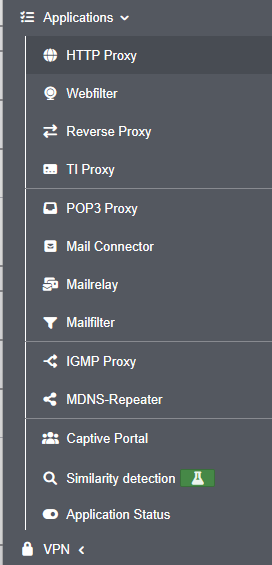
- The content of the "Applications" side menu item has been reorganized and grouped to better reflect logical relationships IDS/IPS has been moved to the Firewall menu, and Nameservers to the Network menu
- A warning message is now displayed when navigating to another page if there are unsaved or invalid entries. This message can be disabled in the advanced settings if desired
- Entries can now be copied in the tables for network objects, services, Wweb filter profiles, ClientlessVPN, and users
- Miscellaneous
- The minimum length for newly created keys has been increased to 2048 bits
- In the network configuration, two RDNSS addresses can now be configured when IPv6 address allocation is enabled
- The spam report has been visually updated and now adapts better to the requirements of the respective end device
- For the Entra ID directory type, extended attribute names can now be configured in AD/LDAP authentication
- Unknown names within a forward zone can now optionally be resolved via external name servers to improve compatibility with external CNAME targets
- WireGuard
- When creating a new WireGuard connection, advanced settings (zones and network objects) can now be configured for AD users and local users as well — similar to peers
- Setup Wizard
- Improvements to the Setup Wizard
- When logging in to a new UTM for the first time, an existing configuration can now be imported directly
- Webinterface
- The content of the "Applications" side menu item has been reorganized and grouped to better reflect logical relationships IDS/IPS has been moved to the Firewall menu, and Nameservers to the Network menu
- A warning message is now displayed when navigating to another page if there are unsaved or invalid entries. This message can be disabled in the advanced settings if desired
- Entries can now be copied in the tables for network objects, services, Wweb filter profiles, ClientlessVPN, and users
- Miscellaneous
- The minimum length for newly created keys has been increased to 2048 bits
- In the network configuration, two RDNSS addresses can now be configured when IPv6 address allocation is enabled
- The spam report has been visually updated and now adapts better to the requirements of the respective end device
- For the Entra ID directory type, extended attribute names can now be configured in AD/LDAP authentication
- Unknown names within a forward zone can now optionally be resolved via external name servers to improve compatibility with external CNAME targets

Übersicht
Overview
Overview
Legende:
Neue Artikel
New articles
New articles
Aktualisierte Artikel
updated articles
updated articles
InstallationsumgebungInstallation environmentInstallation environment
InbetriebnahmeCommissioningCommissioning
- Modellbezogene Schritt-für-Schritt-AnleitungenModel-specific step-by-step instructionsModel-specific step-by-step instructions:
Installation
Hardware
Klicken für dauerhafte Anzeige
Wir empfehlen die Verwendung eines externen Gehäuses
We recommend the use of an external case
We recommend the use of an external case
- Rackmontage
Software
- Bios / UEFI EinstellungenBios / UEFI settingsBios / UEFI settings
- VirtualisierungVirtualizationVirtualization
KonfigurationConfigurationConfiguration
KonfigurationsverwaltungConfiguration ManagementConfiguration Management
- Einspielen einer Konfiguration über Zero-TouchImporting a configuration via Zero-TouchImporting a configuration via Zero-Touch
WerkseinstellungenFactory settingsFactory settings
ZugriffAccessAccess
Unified Security Console
- Konfigurations- und Anwendungs-Management mit der Unified Security ConsoleConfiguration and application management with the Unified Security ConsoleConfiguration and application management with the Unified Security Console
- Konfiguration der API KeysConfiguration of the API KeysConfiguration of the API Keys
LizenzenLicensesLicenses
Trainings / SchulungenTrainingsTrainings
Securepoint Open Web
- Securepoint BasistrainingsSecurepoint basic trainingsSecurepoint basic trainings
- Internet
- NetzwerkNetworkNetwork
- AnwendungenApplicationsApplications
- VPN
- Monitoring
- Zero Trust (Prinzip der geringsten BerechtigungPrinciple of least justificationPrinciple of least justification)
UTM ProduktschulungenUTM product trainingsUTM product trainings
- Zahlreiche Online & Präsenz Zertifizierungs-Trainings, z.B.:Many online certification trainings, i.e.:Many online certification trainings, i.e.:
NetzwerkNetworkNetwork
Aktualisierte Artikel
updated articles
updated articles
ServereinstellungenServer settingsServer settings
- Ethernet
- PPPoE / PPTP
-
- Mobile
-
- WLAN
- Bridge
- Tunnel-VerbindungenTunnel connectionsTunnel connections
- Bond-SchnittstellenBond interfacesBond interfaces
NetzwerkkonfigurationNetwork configurationNetwork configuration
- KonfigurationConfigurationConfiguration
Routing
- DHCP-Server
- DHCP-Relay
DHCP
Nameserver
notempty
QoS
ZoneneinstellungenZone settingsZone settings
NetzwerkwerkzeugeNetwork toolsNetwork tools
- Hot-Standby / Cluster
- Interface- / Routing-Fallback
Cluster / Fallback
Firewall
Aktualisierte Artikel
updated articles
updated articles
GeoIP
GeoIPPaketfilter / PortfilterPacketfilter / PortfilterPacketfilter / Portfilter
Implizite RegelnImplied rulesImplied rules
PortweiterleitungPort forwardingPort forwarding
FailToBan (IDS / IPS)
notempty
NetzwerktopologieNetwork topologyNetwork topology
VoIP konfigurierenConfigure VoIPConfigure VoIP
- VoIP konfigurierenConfigure VoIPConfigure VoIP
AnwendungenApplicationsApplications
- geändertes Standardverhalten ab v12.2.0 !Changed default behaviour as of v12.2.0 !Changed default behaviour as of v12.2.0 !
HTTP-Proxy
Webfilter
Captive Portal
Reverse-Proxy
IGMP-Proxy
TI-Proxy
Mail-Connector
Mailrelay
Mailfilter
FailToBan (IDS / IPS)
Nameserver
mDNS-Repeater
ÄhnlichkeitserkennungÄhnlichkeitserkennungÄhnlichkeitserkennung
Ähnlichkeitserkennung
Ähnlichkeitserkennung
Ähnlichkeitserkennung
(Experimentelles Feature )
(Experimentelles Feature )
(Experimentelles Feature )
AnwendungsstatusApplication statusApplication status
VPN
- Best Practice: WireGuardBest Practice: WireGuardBest Practice: WireGuard
- Best Practice:
- Best Practice: Roadwarrior mit einem Ziel hinter S2SBest Practice: Roadwarrior with a target behind S2SBest Practice: Roadwarrior with a target behind S2S{
Roadwarrior Verbindungen (End-to-Site-VPN)Roadwarrior Connection (End-to-Site-VPN)Roadwarrior Connection (End-to-Site-VPN)
Klicken für dauerhafte Anzeige
Alle Artikel zu Roadwarrior Verbindungen
All articles about Roadwarrior connections
All articles about Roadwarrior connections
- WireGuard
- SSL-VPN (OpenVPN)
- IPSec
- L2TP
Site-to-Site VerbindungenSite-to-Site ConnectionsSite-to-Site Connections
Klicken für dauerhafte Anzeige
- WireGuard
- SSL-VPN (OpenVPN)
- IPSec