 |

 |
|
Neue Beta-Version
New beta version
New beta version
- Neue Features
- Admin- und User-Frontend der UTM stehen nun auch in polnischer Sprache zur Verfügung (experimentell).
- Im Verschlüsselungs-Dialog kann jetzt der Sicherheitsmodus gesetzt werden - bei Bedarf werden Zertifikate markiert, die ein bestimmtes Sicherheitslevel unterschreiten
- In allen Dialogen, die Tabellen enthalten, kann nun eine spaltenspezifische Suchfunktion genutzt werden
- Features
- Cluster
- In einem Cluster stehen die Konfigurationen für Primary und Spare nun auf beiden Geräten zum Download zur Verfügung
- Im Cluster Assistenten können für mehrere Schnittstellen virtuelle IPs anlegt werden
- HTTP-Proxy
- Das Logging des HTTP-Proxy-Caches wurde erweitert
- Im HTTP-Proxy kann die Anzahl der Threads konfiguriert werden
- Mailfilter
- Im Mailfilter kann konfiguriert werden, ob und wann eine E-Mail erneut gescannt werden soll
- Unterscheidung zwischen dem technischen und dem sichtbaren Absender im Mailfilter
- New features
- The UTM admin and user frontends are now also available in Polish (experimental). The language does not switch automatically based on the browser. Use the URL parameter "lang=pl-beta".
- Security mode can now be set in the encryption dialog. In the certificate dialog, certificates that fall below a certain security level are flagged, if configured accordingly
- A column-specific search function can now be used in all dialogs that contain tables
- Features
- Cluster
- In a cluster, the configurations for the primary and spare devices are now available for download on both devices
- The mail archive is now synchronized across both machines in the cluster
- To facilitate the transition from existing UTMs to cluster UTMs, users can now create virtual IPs for multiple interfaces or convert existing IPs in the Cluster Wizard
- HTTP Proxy
- HTTP proxy cache logging has been enhanced. Debug logs can now be enabled specifically for selected areas and detail levels to facilitate the analysis of complex or sporadic proxy issues
- The number of threads in the HTTP proxy can now be configured
- Mailfilter
- When resending an email from quarantine, the global admin email address is now used as the sender
- In the mail filter settings, you can configure whether and when an email should be scanned again if an error occurred during initial processing
- When adding filter rules in the mail filter, you can distinguish between the technical and the visible sender
- Mailrelay
- The DKIM result "policy" can be used for filter rules. Additionally, accepted DKIM algorithms and minimum key lengths can be configured individually
- TLS requirements can be configured per domain/hostname
- New features
- The UTM admin and user frontends are now also available in Polish (experimental). The language does not switch automatically based on the browser. Use the URL parameter "lang=pl-beta".
- Security mode can now be set in the encryption dialog. In the certificate dialog, certificates that fall below a certain security level are flagged, if configured accordingly
- A column-specific search function can now be used in all dialogs that contain tables
- Features
- Cluster
- In a cluster, the configurations for the primary and spare devices are now available for download on both devices
- The mail archive is now synchronized across both machines in the cluster
- To facilitate the transition from existing UTMs to cluster UTMs, users can now create virtual IPs for multiple interfaces or convert existing IPs in the Cluster Wizard
- HTTP Proxy
- HTTP proxy cache logging has been enhanced. Debug logs can now be enabled specifically for selected areas and detail levels to facilitate the analysis of complex or sporadic proxy issues
- The number of threads in the HTTP proxy can now be configured
- Mailfilter
- When resending an email from quarantine, the global admin email address is now used as the sender
- In the mail filter settings, you can configure whether and when an email should be scanned again if an error occurred during initial processing
- When adding filter rules in the mail filter, you can distinguish between the technical and the visible sender
- Mailrelay
- The DKIM result "policy" can be used for filter rules. Additionally, accepted DKIM algorithms and minimum key lengths can be configured individually
- TLS requirements can be configured per domain/hostname
14.2.0
Example: https://192.168.175.1:11115/?lang=pl-beta
Example: https://192.168.175.1:11115/?lang=pl-beta
- Mailrelay
- Filtermöglichkeiten für DKIM-Ergebnis „policy“
- TLS-Anforderungen können pro Domain/Hostname konfiguriert werden
- Wireguard
- Erweiterte Einstellungen (Zonen und Netzwerkobjekte) bei Wireguard-Verbindung auch für AD-Benutzer und lokale Benutzer im Assistenten
- Installationsassistent
- Verbesserungen im Installationsassistenten
- Import einer Konfiguration beim ersten Login auf eine neue UTM
- Webinterface
- Sonstiges
- Die minimale Länge für neu angelegte Schlüssel wurde auf 2048 Bit erhöht
- Zwei RDNSS Adressen bei IPv6
- Für den Verzeichnistyp Entra ID können in der AD/LDAP Authentifizierung jetzt erweiterte Attributnamen konfiguriert werden
- Unbekannte Namen innerhalb einer Forward-Zone können nun optional zusätzlich über externe Nameserver aufgelöst werden, um die Kompatibilität mit externen CNAME-Zielen zu verbessern
- WireGuard
- When creating a new WireGuard connection, advanced settings (zones and network objects) can now be configured for AD users and local users as well — similar to peers
- Setup Wizard
- Improvements to the Setup Wizard
- When logging in to a new UTM for the first time, an existing configuration can now be imported directly
- Webinterface
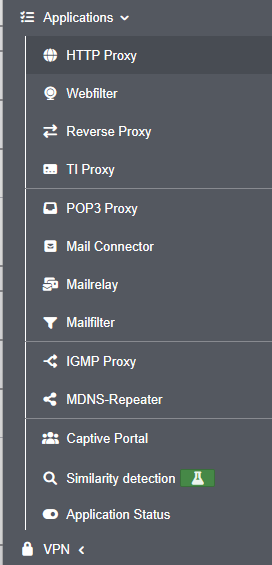
- The content of the "Applications" side menu item has been reorganized and grouped to better reflect logical relationships IDS/IPS has been moved to the Firewall menu, and Nameservers to the Network menu
- A warning message is now displayed when navigating to another page if there are unsaved or invalid entries. This message can be disabled in the advanced settings if desired
- Entries can now be copied in the tables for network objects, services, Wweb filter profiles, ClientlessVPN, and users
- Miscellaneous
- The minimum length for newly created keys has been increased to 2048 bits
- In the network configuration, two RDNSS addresses can now be configured when IPv6 address allocation is enabled
- The spam report has been visually updated and now adapts better to the requirements of the respective end device
- For the Entra ID directory type, extended attribute names can now be configured in AD/LDAP authentication
- Unknown names within a forward zone can now optionally be resolved via external name servers to improve compatibility with external CNAME targets
- WireGuard
- When creating a new WireGuard connection, advanced settings (zones and network objects) can now be configured for AD users and local users as well — similar to peers
- Setup Wizard
- Improvements to the Setup Wizard
- When logging in to a new UTM for the first time, an existing configuration can now be imported directly
- Webinterface
- The content of the "Applications" side menu item has been reorganized and grouped to better reflect logical relationships IDS/IPS has been moved to the Firewall menu, and Nameservers to the Network menu
- A warning message is now displayed when navigating to another page if there are unsaved or invalid entries. This message can be disabled in the advanced settings if desired
- Entries can now be copied in the tables for network objects, services, Wweb filter profiles, ClientlessVPN, and users
- Miscellaneous
- The minimum length for newly created keys has been increased to 2048 bits
- In the network configuration, two RDNSS addresses can now be configured when IPv6 address allocation is enabled
- The spam report has been visually updated and now adapts better to the requirements of the respective end device
- For the Entra ID directory type, extended attribute names can now be configured in AD/LDAP authentication
- Unknown names within a forward zone can now optionally be resolved via external name servers to improve compatibility with external CNAME targets

Übersicht
Overview
Overview
Legende:
Neue Artikel
New articles
New articles
Aktualisierte Artikel
updated articles
updated articles
InstallationsumgebungInstallation environmentInstallation environment
InbetriebnahmeCommissioningCommissioning
- Modellbezogene Schritt-für-Schritt-AnleitungenModel-specific step-by-step instructionsModel-specific step-by-step instructions:
Installation
Hardware
Klicken für dauerhafte Anzeige
Wir empfehlen die Verwendung eines externen Gehäuses
We recommend the use of an external case
We recommend the use of an external case
- Rackmontage
Software
- Bios / UEFI EinstellungenBios / UEFI settingsBios / UEFI settings
- VirtualisierungVirtualizationVirtualization
KonfigurationConfigurationConfiguration
KonfigurationsverwaltungConfiguration ManagementConfiguration Management
- Einspielen einer Konfiguration über Zero-TouchImporting a configuration via Zero-TouchImporting a configuration via Zero-Touch
WerkseinstellungenFactory settingsFactory settings
ZugriffAccessAccess
Unified Security Console
- Konfigurations- und Anwendungs-Management mit der Unified Security ConsoleConfiguration and application management with the Unified Security ConsoleConfiguration and application management with the Unified Security Console
- Konfiguration der API KeysConfiguration of the API KeysConfiguration of the API Keys
LizenzenLicensesLicenses
Trainings / SchulungenTrainingsTrainings
Securepoint Open Web
- Securepoint BasistrainingsSecurepoint basic trainingsSecurepoint basic trainings
- Internet
- NetzwerkNetworkNetwork
- AnwendungenApplicationsApplications
- VPN
- Monitoring
- Zero Trust (Prinzip der geringsten BerechtigungPrinciple of least justificationPrinciple of least justification)
UTM ProduktschulungenUTM product trainingsUTM product trainings
- Zahlreiche Online & Präsenz Zertifizierungs-Trainings, z.B.:Many online certification trainings, i.e.:Many online certification trainings, i.e.:
NetzwerkNetworkNetwork
Aktualisierte Artikel
updated articles
updated articles
ServereinstellungenServer settingsServer settings
- Ethernet
- PPPoE / PPTP
-
- Mobile
-
- WLAN
- Bridge
- Tunnel-VerbindungenTunnel connectionsTunnel connections
- Bond-SchnittstellenBond interfacesBond interfaces
NetzwerkkonfigurationNetwork configurationNetwork configuration
- KonfigurationConfigurationConfiguration
Routing
- DHCP-Server
- DHCP-Relay
DHCP
Nameserver
notempty
QoS
ZoneneinstellungenZone settingsZone settings
NetzwerkwerkzeugeNetwork toolsNetwork tools
- Hot-Standby / Cluster
- Interface- / Routing-Fallback
Cluster / Fallback
Firewall
Aktualisierte Artikel
updated articles
updated articles
GeoIP
GeoIPPaketfilter / PortfilterPacketfilter / PortfilterPacketfilter / Portfilter
Implizite RegelnImplied rulesImplied rules
PortweiterleitungPort forwardingPort forwarding
FailToBan (IDS / IPS)
notempty
NetzwerktopologieNetwork topologyNetwork topology
VoIP konfigurierenConfigure VoIPConfigure VoIP
- VoIP konfigurierenConfigure VoIPConfigure VoIP
AnwendungenApplicationsApplications
- geändertes Standardverhalten ab v12.2.0 !Changed default behaviour as of v12.2.0 !Changed default behaviour as of v12.2.0 !
HTTP-Proxy
Webfilter
Captive Portal
Reverse-Proxy
IGMP-Proxy
TI-Proxy
Mail-Connector
Mailrelay
Mailfilter
FailToBan (IDS / IPS)
Nameserver
mDNS-Repeater
ÄhnlichkeitserkennungÄhnlichkeitserkennungÄhnlichkeitserkennung
Ähnlichkeitserkennung
Ähnlichkeitserkennung
Ähnlichkeitserkennung
(Experimentelles Feature )
(Experimentelles Feature )
(Experimentelles Feature )
AnwendungsstatusApplication statusApplication status
VPN
- Best Practice: WireGuardBest Practice: WireGuardBest Practice: WireGuard
- Best Practice:
- Best Practice: Roadwarrior mit einem Ziel hinter S2SBest Practice: Roadwarrior with a target behind S2SBest Practice: Roadwarrior with a target behind S2S{
Roadwarrior Verbindungen (End-to-Site-VPN)Roadwarrior Connection (End-to-Site-VPN)Roadwarrior Connection (End-to-Site-VPN)
Klicken für dauerhafte Anzeige
Alle Artikel zu Roadwarrior Verbindungen
All articles about Roadwarrior connections
All articles about Roadwarrior connections
- WireGuard
- SSL-VPN (OpenVPN)
- IPSec
- L2TP
Site-to-Site VerbindungenSite-to-Site ConnectionsSite-to-Site Connections
Klicken für dauerhafte Anzeige
- WireGuard
- SSL-VPN (OpenVPN)
- IPSec