 |

 |
|
Neue Beta-Version
New beta version
New beta version
- Highlights of version 14.2.1
- Der Button für den Download der Support-Informationen wurde an den linken unteren Bildschirmrand in die Tool-Leiste verschobenThe button for downloading support information has been moved to the bottom left of the screen in the toolbarThe button for downloading support information has been moved to the bottom left of the screen in the toolbar
- Nutzern von FreeOTP wird für Securepoint-VPN-Verbindungen für eine bessere Erkennbarkeit nun das Securepoint-Logo angezeigtFor Securepoint VPN connections, the Securepoint logo is now displayed to FreeOTP users for greater clarityFor Securepoint VPN connections, the Securepoint logo is now displayed to FreeOTP users for greater clarity
- Im Admin UI und im User UI kann zusammen mit dem VPN Client Installer jetzt eine WireGuard-Konfiguration heruntergeladen werdenIn the Admin UI and User UI, a WireGuard configuration can now be downloaded alongside the VPN client installerIn the Admin UI and User UI, a WireGuard configuration can now be downloaded alongside the VPN client installer
- Im SSL-VPN wird der Status der Client-Gegenstellen angezeigtIn SSL VPN, the status of client endpoints is displayedIn SSL VPN, the status of client endpoints is displayed
- Im SSL-VPN kann eine S2S Client-Verbindung jetzt manuell getrennt werden, damit der Client durch Neuaufbau der Verbindung geänderte Einstellungen übernimmtIn SSL VPN, an S2S client connection can now be disconnected manually so that the client applies any changed settings by re-establishing the connectionIn SSL VPN, an S2S client connection can now be disconnected manually so that the client applies any changed settings by re-establishing the connection
- Per CLI-Befehl kann der bevorzugte Mobilfunkmodus eines Modems gesetzt werdenThe preferred mobile network m Admin UI und im User UI kann zusammode for a modem can be set via a CLI commandThe preferred mobile network m Admin UI und im User UI kann zusammode for a modem can be set via a CLI command
- Bei der Konfiguration von OAuth2-Verbindungen können ausschließlich RSA-Zertifikate ausgewählt werdenWhen configuring OAuth2 connections, only RSA certificates can be selectedWhen configuring OAuth2 connections, only RSA certificates can be selected
Highlights of version 14.2.0
hide
Klicken für dauerhafte Anzeige
- Neue Features
- Admin- und User-Frontend der UTM stehen nun auch in polnischer Sprache zur Verfügung (experimentell).
- Im Verschlüsselungs-Dialog kann jetzt der Sicherheitsmodus gesetzt werden - bei Bedarf werden Zertifikate markiert, die ein bestimmtes Sicherheitslevel unterschreiten
- In allen Dialogen, die Tabellen enthalten, kann nun eine spaltenspezifische Suchfunktion genutzt werden
- Features Updates
- Cluster
- In einem Cluster stehen die Konfigurationen für Primary und Spare nun auf beiden Geräten zum Download zur Verfügung
- Im Cluster Assistenten können für mehrere Schnittstellen virtuelle IPs angelegt werden
- HTTP-Proxy
- Das Logging des HTTP-Proxy-Caches wurde erweitert
- Im HTTP-Proxy kann die Anzahl der Threads konfiguriert werden
- Mailfilter
- Im Mailfilter kann konfiguriert werden, ob und wann eine E-Mail erneut gescannt werden soll
- Unterscheidung zwischen dem technischen und dem sichtbaren Absender im Mailfilter
- New features
- The UTM admin and user frontends are now also available in Polish (experimental). The language does not switch automatically based on the browser. Use the URL parameter "lang=pl-beta".
- Security mode can now be set in the encryption dialog. In the certificate dialog, certificates that fall below a certain security level are flagged, if configured accordingly
- A column-specific search function can now be used in all dialogs that contain tables
- Features Updates
- Cluster
- In a cluster, the configurations for the primary and spare devices are now available for download on both devices
- The mail archive is now synchronized across both machines in the cluster
- To facilitate the transition from existing UTMs to cluster UTMs, users can now create virtual IPs for multiple interfaces or convert existing IPs in the Cluster Wizard
- HTTP Proxy
- HTTP proxy cache logging has been enhanced. Debug logs can now be enabled specifically for selected areas and detail levels to facilitate the analysis of complex or sporadic proxy issues
- The number of threads in the HTTP proxy can now be configured
- Mailfilter
- When resending an email from quarantine, the global admin email address is now used as the sender
- In the mail filter settings, you can configure whether and when an email should be scanned again if an error occurred during initial processing
- When adding filter rules in the mail filter, you can distinguish between the technical and the visible sender
- Mailrelay
- The DKIM result "policy" can be used for filter rules. Additionally, accepted DKIM algorithms and minimum key lengths can be configured individually
- TLS requirements can be configured per domain/hostname
- New features
- The UTM admin and user frontends are now also available in Polish (experimental). The language does not switch automatically based on the browser. Use the URL parameter "lang=pl-beta".
- Security mode can now be set in the encryption dialog. In the certificate dialog, certificates that fall below a certain security level are flagged, if configured accordingly
- A column-specific search function can now be used in all dialogs that contain tables
- Features Updates
- Cluster
- In a cluster, the configurations for the primary and spare devices are now available for download on both devices
- The mail archive is now synchronized across both machines in the cluster
- To facilitate the transition from existing UTMs to cluster UTMs, users can now create virtual IPs for multiple interfaces or convert existing IPs in the Cluster Wizard
- HTTP Proxy
- HTTP proxy cache logging has been enhanced. Debug logs can now be enabled specifically for selected areas and detail levels to facilitate the analysis of complex or sporadic proxy issues
- The number of threads in the HTTP proxy can now be configured
- Mailfilter
- When resending an email from quarantine, the global admin email address is now used as the sender
- In the mail filter settings, you can configure whether and when an email should be scanned again if an error occurred during initial processing
- When adding filter rules in the mail filter, you can distinguish between the technical and the visible sender
- Mailrelay
- The DKIM result "policy" can be used for filter rules. Additionally, accepted DKIM algorithms and minimum key lengths can be configured individually
- TLS requirements can be configured per domain/hostname
Example: https://192.168.175.1:11115/?lang=pl-beta
Example: https://192.168.175.1:11115/?lang=pl-beta
- Mailrelay
- Filtermöglichkeiten für DKIM-Ergebnis „policy“
- TLS-Anforderungen können pro Domain/Hostname konfiguriert werden
- Wireguard
- Erweiterte Einstellungen (Zonen und Netzwerkobjekte) bei Wireguard-Verbindung auch für AD-Benutzer und lokale Benutzer im Assistenten
- Installationsassistent
- Verbesserungen im Installationsassistenten
- Import einer Konfiguration beim ersten Login auf eine neue UTM
- Webinterface
- Sonstiges
- Die minimale Länge für neu angelegte Schlüssel wurde auf 2048 Bit erhöht
- Zwei RDNSS Adressen bei IPv6
- Für den Verzeichnistyp Entra ID können in der AD/LDAP Authentifizierung jetzt erweiterte Attributnamen konfiguriert werden
- Unbekannte Namen innerhalb einer Forward-Zone können nun optional zusätzlich über externe Nameserver aufgelöst werden, um die Kompatibilität mit externen CNAME-Zielen zu verbessern
- WireGuard
- When creating a new WireGuard connection, advanced settings (zones and network objects) can now be configured for AD users and local users as well — similar to peers
- Setup Wizard
- Improvements to the Setup Wizard
- When logging in to a new UTM for the first time, an existing configuration can now be imported directly
- Webinterface
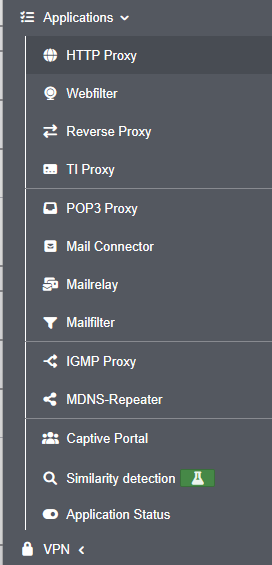
- The content of the "Applications" side menu item has been reorganized and grouped to better reflect logical relationships IDS/IPS has been moved to the Firewall menu, and Nameservers to the Network menu
- A warning message is now displayed when navigating to another page if there are unsaved or invalid entries. This message can be disabled in the advanced settings if desired
- Entries can now be copied in the tables for network objects, services, Wweb filter profiles, ClientlessVPN, and users
- Miscellaneous
- The minimum length for newly created keys has been increased to 2048 bits
- In the network configuration, two RDNSS addresses can now be configured when IPv6 address allocation is enabled
- The spam report has been visually updated and now adapts better to the requirements of the respective end device
- For the Entra ID directory type, extended attribute names can now be configured in AD/LDAP authentication
- Unknown names within a forward zone can now optionally be resolved via external name servers to improve compatibility with external CNAME targets
- WireGuard
- When creating a new WireGuard connection, advanced settings (zones and network objects) can now be configured for AD users and local users as well — similar to peers
- Setup Wizard
- Improvements to the Setup Wizard
- When logging in to a new UTM for the first time, an existing configuration can now be imported directly
- Webinterface
- The content of the "Applications" side menu item has been reorganized and grouped to better reflect logical relationships IDS/IPS has been moved to the Firewall menu, and Nameservers to the Network menu
- A warning message is now displayed when navigating to another page if there are unsaved or invalid entries. This message can be disabled in the advanced settings if desired
- Entries can now be copied in the tables for network objects, services, Wweb filter profiles, ClientlessVPN, and users
- Miscellaneous
- The minimum length for newly created keys has been increased to 2048 bits
- In the network configuration, two RDNSS addresses can now be configured when IPv6 address allocation is enabled
- The spam report has been visually updated and now adapts better to the requirements of the respective end device
- For the Entra ID directory type, extended attribute names can now be configured in AD/LDAP authentication
- Unknown names within a forward zone can now optionally be resolved via external name servers to improve compatibility with external CNAME targets

Übersicht
Overview
Overview
- Installation
- KonfigurationConfigurationConfiguration
- Trainings / SchulungenTrainingsTrainings
- NetzwerkNetworkNetwork
- Firewall
- AnwendungenApplicationsApplications
- VPN
- AuthentifizierungAuthenticationAuthentication
- Extras
- Monitoring
- DokumentationDocumentationDocumentation
- Userinterface
- notemptyab September 2026from September 2026from September 2026
Legend:
Neue Artikel
New articles
New articles
Aktualisierte Artikel
updated articles
updated articles
InstallationsumgebungInstallation environmentInstallation environment
InbetriebnahmeCommissioningCommissioning
- Modellbezogene Schritt-für-Schritt-AnleitungenModel-specific step-by-step instructionsModel-specific step-by-step instructions:
Installation
Hardware
Klicken für dauerhafte Anzeige
Wir empfehlen die Verwendung eines externen Gehäuses
We recommend the use of an external case
We recommend the use of an external case
- Rackmontage
Software
- Bios / UEFI EinstellungenBios / UEFI settingsBios / UEFI settings
- VirtualisierungVirtualizationVirtualization
KonfigurationConfigurationConfiguration
KonfigurationsverwaltungConfiguration ManagementConfiguration Management
- Einspielen einer Konfiguration über Zero-TouchImporting a configuration via Zero-TouchImporting a configuration via Zero-Touch
WerkseinstellungenFactory settingsFactory settings
ZugriffAccessAccess
Unified Security Console
- Konfigurations- und Anwendungs-Management mit der Unified Security ConsoleConfiguration and application management with the Unified Security ConsoleConfiguration and application management with the Unified Security Console
- Konfiguration der API KeysConfiguration of the API KeysConfiguration of the API Keys
LizenzenLicensesLicenses
Trainings / SchulungenTrainingsTrainings
Securepoint Open Web
- Securepoint BasistrainingsSecurepoint basic trainingsSecurepoint basic trainings
- Internet
- NetzwerkNetworkNetwork
- AnwendungenApplicationsApplications
- VPN
- Monitoring
- Zero Trust (Prinzip der geringsten BerechtigungPrinciple of least justificationPrinciple of least justification)
UTM ProduktschulungenUTM product trainingsUTM product trainings
- Zahlreiche Online & Präsenz Zertifizierungs-Trainings, z.B.:Many online certification trainings, i.e.:Many online certification trainings, i.e.:
NetzwerkNetworkNetwork
ServereinstellungenServer settingsServer settings
- Ethernet
- PPPoE / PPTP
-
- Mobile
-
- WLAN
- Bridge
- Tunnel-VerbindungenTunnel connectionsTunnel connections
- Bond-SchnittstellenBond interfacesBond interfaces
NetzwerkkonfigurationNetwork configurationNetwork configuration
- KonfigurationConfigurationConfiguration
- Best PracticeBest PracticeBest Practice
Routing
- DHCP-Server
- DHCP-Relay
DHCP
Nameserver
notempty
QoS
ZoneneinstellungenZone settingsZone settings
NetzwerkwerkzeugeNetwork toolsNetwork tools
- Hot-Standby / Cluster
- Interface- / Routing-Fallback
Cluster / Fallback
Firewall
GeoIP
GeoIPPaketfilter / PortfilterPacketfilter / PortfilterPacketfilter / Portfilter
Implizite RegelnImplied rulesImplied rules
PortweiterleitungPort forwardingPort forwarding
FailToBan (IDS / IPS)
notempty
NetzwerktopologieNetwork topologyNetwork topology
VoIP konfigurierenConfigure VoIPConfigure VoIP
- VoIP konfigurierenConfigure VoIPConfigure VoIP
AnwendungenApplicationsApplications
- geändertes Standardverhalten ab v12.2.0 !Changed default behaviour as of v12.2.0 !Changed default behaviour as of v12.2.0 !
HTTP-Proxy
Webfilter
Captive Portal
Reverse-Proxy
IGMP-Proxy
TI-Proxy
Mail-Connector
Mailrelay
Mailfilter
FailToBan (IDS / IPS)
Nameserver
mDNS-Repeater
ÄhnlichkeitserkennungÄhnlichkeitserkennungÄhnlichkeitserkennung
Ähnlichkeitserkennung
Ähnlichkeitserkennung
Ähnlichkeitserkennung
(Experimentelles Feature )
(Experimentelles Feature )
(Experimentelles Feature )
AnwendungsstatusApplication statusApplication status
VPN
- Best Practice: WireGuardBest Practice: WireGuardBest Practice: WireGuard
- Best Practice:
- Best Practice: Roadwarrior mit einem Ziel hinter S2SBest Practice: Roadwarrior with a target behind S2SBest Practice: Roadwarrior with a target behind S2S
Roadwarrior Verbindungen (End-to-Site-VPN)Roadwarrior Connection (End-to-Site-VPN)Roadwarrior Connection (End-to-Site-VPN)
Klicken für dauerhafte Anzeige
Alle Artikel zu Roadwarrior Verbindungen
All articles about Roadwarrior connections
All articles about Roadwarrior connections
- WireGuard
- SSL-VPN (OpenVPN)
- IPSec
- L2TP
Site-to-Site VerbindungenSite-to-Site ConnectionsSite-to-Site Connections
Klicken für dauerhafte Anzeige
- WireGuard
- SSL-VPN (OpenVPN)
- IPSec